

• info@taxtami.com
  • +263 772 226 466
  • | |
  • Our Social
  • Home
  • Domestic Tax Courses
    • Income Tax Courses
    • Value Added Tax Courses (VAT)
    • Capital Gains Tax (CGT)
    • ZIMRA Debt Management Courses
  • TaRMS Essentials
    • Course Menu
    • TaRMS Getting Started
    • TaRMS Taxpayer Profile
    • TaRMS Tax Agents & Assignees
    • TaRMS Tax Return Management
    • TaRMS Tax Clearance
    • TaRMS Payments & Single Account
    • TaRMS Taxpayer Accounting
    • TaRMS Capstone Workflows
  • Reve-News
    • Public Notice Updates
    • Detailed Tax Analysis
  • About Us
  • Contact
TaRMS Essentials Lesson 1.3 Downloading TIN and VAT Certificates The two simplest documents to retrieve in the SSP — the TIN Certificate and the VAT Certificate — and the practical contexts in which banks, tender boards, suppliers, and government departments insist on seeing them.
1

Executive summary

What the TIN and VAT certificates are, what data they contain, and the legal basis on which third parties may demand them.

2

Lesson content

The exact path: Taxpayer Information → Taxpayer Profile → General Information and the side-by-side download buttons. Common formatting issues banks raise.

3

Assessment & policy notes

How TIN and VAT certificates differ from a Tax Clearance certificate (Module 5), and what to do when a name or address on the certificate is wrong.

Executive summary
Lesson content
Assessment
A. Context B. Legislative C. Detailed D. Real-World E. Case Law F. Pitfalls G. Knowledge Check H. Quiz Answers I. Takeaways

A. Lesson Context: The Three Certificates and Why They Confuse

A Zimbabwean taxpayer encounters three distinct certificates issued by ZIMRA in routine business life: the TIN Certificate, the VAT Certificate, and the Tax Clearance Certificate (ITF 263). They look superficially similar — ZIMRA letterhead, taxpayer name, TIN, a digital signature panel — but they serve fundamentally different purposes, and bankers, lawyers, and procurement officers are inconsistent in which one they ask for.

This short lesson serves three functions. It teaches the simplest action on the SSP (downloading TIN/VAT certificates) as a confidence-building exercise. It clarifies the difference between the three certificates so the learner does not waste time fetching the wrong one. And it lays the groundwork for Module 5 (Tax Clearance Certificates), which is altogether more involved.
The certificate triad: TIN = identity proof, VAT = vendor proof, Tax Clearance = good-standing proof. A bank may ask for any of the three, depending on the product they are underwriting.

B. Legislative Framework

1. The TIN Certificate — identity proof

The TIN Certificate is generated automatically on registration of a TIN under the Income Tax Act and the Revenue Authority Act’s administrative procedures. It is not a creature of any particular section; it is a ZIMRA administrative document evidencing that the named person holds a TIN of the stated number. Its legal status is that of a public document under section 4 of the Civil Evidence Act [Chapter 8:01]: it is admissible without further proof.

2. The VAT Certificate — vendor proof

The VAT Certificate is issued under the VAT Act [Chapter 23:12], specifically under the registration provisions in sections 23 to 25. Section 23(8) requires the Commissioner to issue a registration certificate to every registered operator (vendor). Section 23(9) further requires the registered operator to display the certificate at every place of business. The legal duty to display is real and rarely enforced, but during a VAT compliance visit a missing certificate is a recurring audit finding.

3. The Tax Clearance Certificate (ITF 263) — good-standing proof

The ITF 263 is the heavyweight cousin of the other two. It is issued under section 80B of the Income Tax Act (and parallel provisions in other tax Acts) and certifies that the taxpayer has filed all due returns and settled all outstanding amounts as at the date of issue. Module 5 treats it in depth.

4. The Cyber and Data Protection Act overlay

All three certificates contain personal data (TIN, name, business address). When a third party (bank, supplier) requests a certificate, they are receiving personal data within the meaning of section 3 of the Cyber and Data Protection Act. The taxpayer is generally treated as the data subject who has consented by the act of submission; the third party becomes a data controller of that data and is bound by the Act’s data-handling rules.

5. Practice Note — reissue rights

ZIMRA practice (per the Public Notice on TaRMS Migration) is that a taxpayer may regenerate a TIN or VAT certificate at any time at no cost; there is no “original-only” concept. Each download has a fresh issue date.

C. Detailed Conceptual Explanation: The Two Certificates Up Close

1. The TIN Certificate — what is on it

A TIN Certificate is a one-page PDF document containing:

  • ZIMRA letterhead and the words “Taxpayer Identification Number Certificate”.
  • The taxpayer’s legal name (for individuals: as on the National ID; for companies: as on the certificate of incorporation).
  • The 10-digit TIN.
  • Date of issue (the day of download — so always “fresh”).
  • A digital seal / signature panel.

It is the document a bank typically requires when opening a new business bank account, and that the Companies and Other Business Entities Office files alongside the certificate of incorporation.

2. The VAT Certificate — what is on it

A VAT Certificate adds three pieces of information to what the TIN Certificate carries:

  • The VAT registration number (this is now the same as the TIN under TaRMS, but legacy operators may have a separate VAT BP number recorded for historical continuity).
  • The VAT Category (A, B, C, or D — indicating the filing periodicity).
  • The effective date of registration — from which output VAT must be charged.
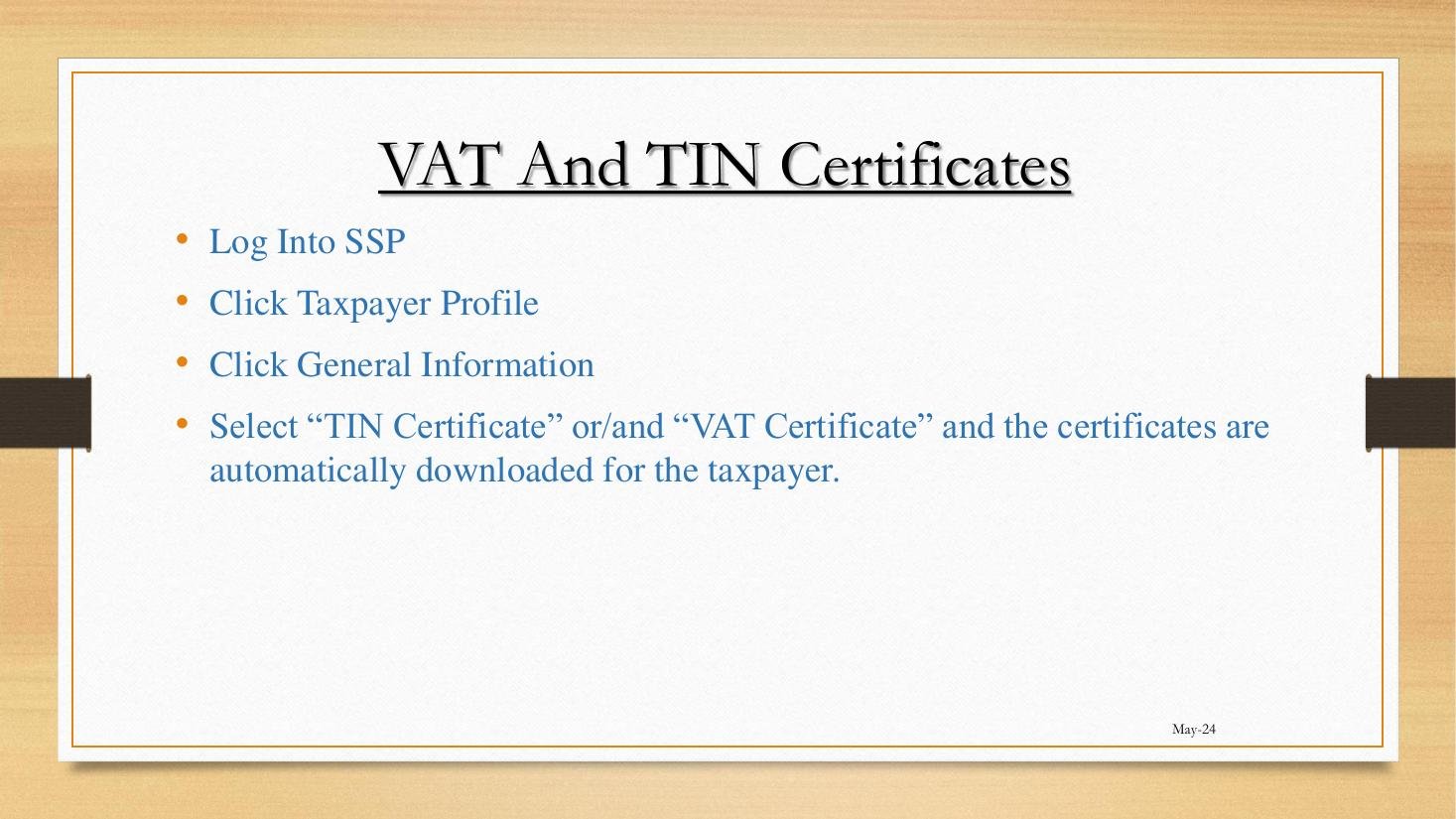
VAT and TIN Certificates path on the SSP
Figure 1.3.A — The path to download both certificates: Taxpayer Profile → General Information → TIN Certificate / VAT Certificate. The certificates are auto-generated and downloaded on click.

3. The download path — click by click

  1. Login to the SSP.
  2. Click Taxpayer Information on the left-hand rail.
  3. Click Taxpayer Profile.
  4. Ensure the General Information tab is active.
  5. Click the TIN Certificate button (or the VAT Certificate button, or both).
  6. The PDF is generated and downloaded to your local Downloads folder.

4. Issue dating and the “currency” of a certificate

Each download generates a fresh PDF with the current date. There is no expiry — the certificate represents the state of registration as at the date of issue. However, banks and procurement offices sometimes informally treat a certificate as “stale” if it is more than 90 days old. The practical solution: download a fresh copy when a counterparty asks. It is free and instant.

5. The Form REV 2 path — correcting wrong data on a certificate

If the certificate shows an incorrect name, address, or business activity, the taxpayer must correct the underlying Taxpayer Profile data before reissue. Two routes:

  • For minor corrections (typo in address, phone number): the user edits the General Information tab directly via the SSP.
  • For substantive changes (legal name change, change in directors, change in trading name): the user lodges a Form REV 2 (Change of Details Application) via Taxpayer Information → Applications → Change of Details, attaching the supporting evidence.
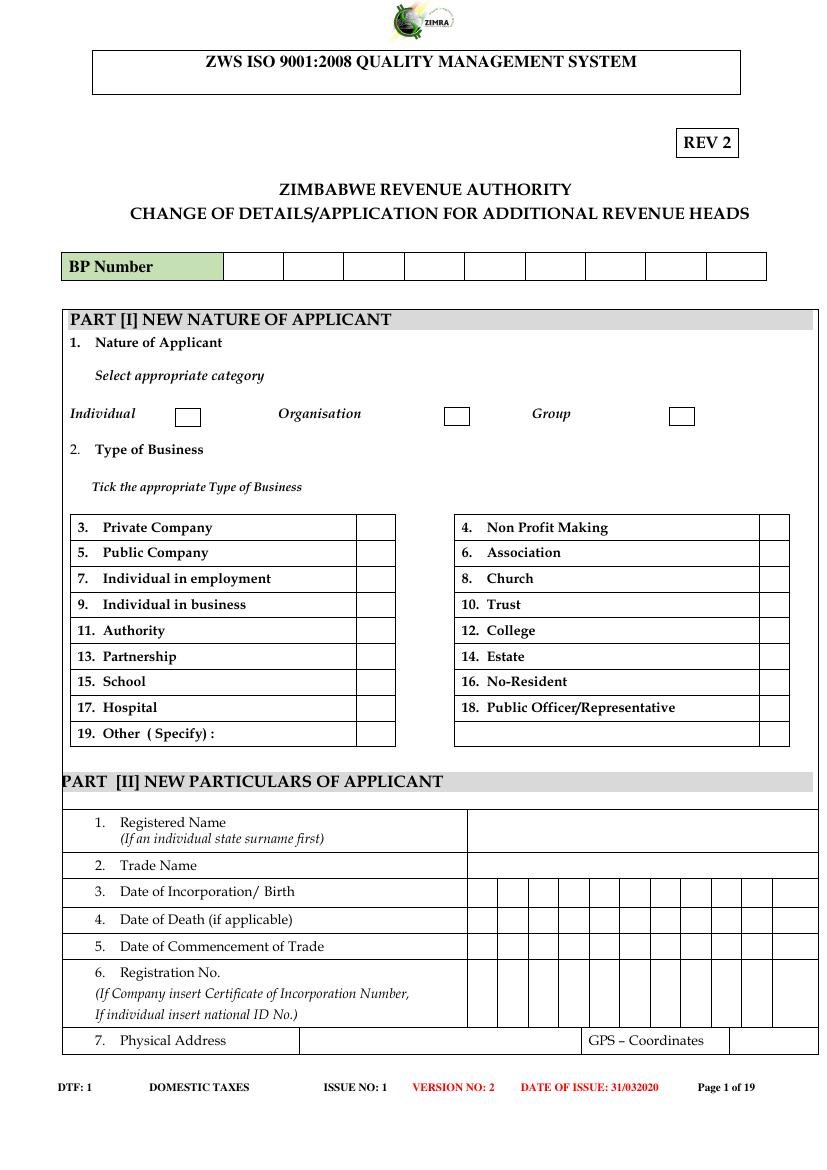
Form REV 2 — Change of Details / Application for Additional Revenue Head
Figure 1.3.B — The legacy paper Form REV 2 (Change of Details / Application for Additional Revenue Head). Now mostly subsumed into the SSP’s Change of Details workflow, but still relevant as the data-capture template that tells you exactly which fields TaRMS treats as material.

6. Why the VAT Certificate must be displayed

Section 23(9) of the VAT Act requires the certificate to be displayed at every place of business. Failure to display has been historically under-enforced, but during a routine VAT audit, compliance officers will note the absence. A printed and laminated copy at the till counter is the conventional remedy.

7. International equivalence

The closest equivalents in regional jurisdictions: South Africa’s VAT 103 (issued by SARS), Kenya’s PIN Certificate plus VAT Certificate (issued by KRA), Botswana’s TIN Certificate plus VAT Registration Certificate (issued by BURS). Practitioners advising cross-border traders should be familiar with the regional patterns.

D. Real-World Applicability

1. Opening a business bank account

Every commercial bank in Zimbabwe requires a TIN Certificate as part of the KYC pack for a corporate or sole-trader account. CABS, CBZ, Stanbic, Standard Chartered, Steward Bank, FBC, and ZB Bank have aligned KYC checklists that all include “TIN Certificate (issued within last 90 days)” as a mandatory item. The taxpayer simply downloads, prints, and submits.

2. Submitting a tender or quotation

Procurement-by-tender under the Public Procurement and Disposal of Public Assets Act often asks for a TIN Certificate, a VAT Certificate (where the bidder is a registered VAT operator), and a Tax Clearance certificate (Module 5). The procurement officer cross-checks the three: a bidder claiming to be VAT-registered must produce the VAT Certificate as proof.

3. Onboarding as a supplier to a large corporate

Big retailers (OK Zimbabwe, Pick n Pay), large manufacturers (Innscor, Delta, Cairns Foods), and state-owned enterprises (NRZ, ZESA) all run supplier-onboarding portals that demand the trio of certificates. A small supplier without a VAT Certificate may still onboard, but pricing must be quoted exclusive of VAT.

4. Cross-border trade documentation

For an importer-exporter, the TIN Certificate is part of the documentation pack at the border. ZIMRA Customs and Excise officers cross-reference the TIN against the importer’s domestic-tax record. Importers without a current TIN Certificate face delays at Beitbridge and Forbes.

5. The lifecycle perspective

Lifecycle stageCertificate(s) needed
Open business bank accountTIN
Register as a vendorVAT (after VAT registration is approved — Lesson 2.2)
Submit tender to governmentTIN + VAT + Tax Clearance (Module 5)
Onboard with a large customerTIN + VAT + Tax Clearance
Annual renewal of practising licencesTax Clearance (some regulators)
Corporate restructuring (M&A)TIN + VAT + History tab printout

E. Case Law Integration

1. Section 4 Civil Evidence Act — admissibility of public documents

In any litigation involving a tax dispute, a TIN or VAT certificate downloaded from the SSP is admissible without further proof under section 4 of the Civil Evidence Act [Chapter 8:01]. The certificate is treated as a public document. The Magistrates’ Court has consistently received SSP-generated PDFs as primary evidence of registration status (see ZIMRA tracker reports from 2024).

2. Mandatory display: Re Tafara Industries (Pvt) Ltd (Magistrates’ Court 2018)

An older but illustrative VAT compliance prosecution: an industrial supplier was fined for non-display of the VAT Certificate at its Tafara warehouse. The defence of “the original was lost” was rejected; the court noted that ZIMRA reissues certificates on request without charge. The principle survives the move to TaRMS — if anything, with download-on-demand the obligation is even simpler to satisfy.

3. The duty of accurate registration data

Section 23(11) of the VAT Act requires a registered operator to notify ZIMRA within 21 days of any change in the particulars on which the registration was based. The penalty under section 23(12) is summary and material. S v. Mukatana (Magistrates’ Court, Bulawayo 2019) imposed a fine on a VAT vendor who had moved business address two years prior without notifying ZIMRA. The cure under TaRMS is the Form REV 2 / Change of Details workflow.

F. Common Pitfalls

1. Sending the wrong certificate

A taxpayer asked for a Tax Clearance sends a TIN Certificate, or vice versa. Fix: read the request carefully — it usually says “ITF 263” (Tax Clearance) or “TIN Certificate” specifically.

2. Sending an old certificate

A bank rejects a certificate that is more than 90 days old. Fix: always re-download on the day of submission. The certificate is free.

3. Trying to download a VAT certificate before VAT registration is approved

If you have just submitted a VAT registration application but it has not yet been approved by ZIMRA, the VAT Certificate button will be greyed out or absent. Fix: wait for the approval notification (typically 5–10 working days for a clean application). See Lesson 2.2.

4. Editing the PDF before sending

Some users try to update old details on the PDF after download. The PDF includes a digital seal that breaks on edit, and the underlying TaRMS record will not match. Fix: correct the data on the SSP first (Form REV 2), then re-download.

5. Confusing the VAT Category with the VAT rate

The Category (A, B, C, or D) on the VAT Certificate refers to the filing period, not the rate. The rate is set by the Finance Act in force (15% standard, with various zero-rated and exempt items). Fix: read Section C of this lesson.

6. Failing to display

The legal duty to display the VAT Certificate at the place of business is real. Fix: print a colour copy, laminate, and post it visibly at the till.

G. Knowledge Check

Question 1

List the three certificates issued by ZIMRA most often encountered in routine business and explain in one sentence what each proves.

Question 2

What is the SSP path to download the TIN Certificate? What is the path to download the VAT Certificate? Are they on the same screen?

Question 3 — Scenario

You are tendering for a contract with a large state-owned enterprise. The tender pack asks for “your latest VAT Registration Certificate”. Your business has not crossed the VAT threshold and is not VAT-registered. How do you respond — what document(s) do you submit, and what wording do you use in your tender response?

Question 4

Your VAT Certificate shows an old trading address (you moved 18 months ago). What are the legal and practical implications, and what is the correct fix?

Question 5

Distinguish, with reference to specific statutes and sections, between a TIN Certificate, a VAT Certificate, and a Tax Clearance Certificate.

H. Quiz Answers with Explanations

Answer 1

TIN Certificate — proves that the named taxpayer is registered with ZIMRA and identifies them by their 10-digit TIN. VAT Certificate — proves that the named taxpayer is a registered VAT operator under sections 23–25 of the VAT Act, including the VAT Category and effective date. Tax Clearance Certificate (ITF 263) — proves that the named taxpayer has filed all due returns and settled all outstanding amounts as at the date of issue under section 80B of the Income Tax Act.

Answer 2

Both certificates are downloaded from the same screen. Path: Taxpayer Information → Taxpayer Profile → General Information → (TIN Certificate / VAT Certificate). The VAT Certificate button only appears for a taxpayer with an approved VAT registration; the TIN Certificate is always available.

Answer 3

You cannot submit a VAT Certificate you do not have. The correct response in the tender:

  1. State plainly in your covering letter that the bidder is below the compulsory VAT threshold and is therefore not a registered VAT operator under sections 23–25 of the VAT Act.
  2. Submit your TIN Certificate (proving registered status) and your Tax Clearance Certificate (proving good standing).
  3. Quote pricing exclusive of VAT and indicate that VAT will not be charged on the supply.
  4. If the procurement clerk insists on a VAT Certificate as a precondition, the bid is technically non-compliant; the taxpayer’s realistic option is to register voluntarily under section 23(2) of the VAT Act if the contract economics support it.

Answer 4

Legal implications: under section 23(11) of the VAT Act, the taxpayer was obliged to notify ZIMRA within 21 days of moving address. Eighteen months of non-notification is a continuing breach exposing the taxpayer to penalty under section 23(12). S v. Mukatana (2019) is on point.

Practical fix:

  1. Lodge a Form REV 2 / Change of Details via the SSP at Taxpayer Information → Applications → Change of Details, attaching proof of new address (utility bill, lease agreement).
  2. Once ZIMRA approves the change, re-download the VAT Certificate — it now reflects the correct address.
  3. Display the new certificate at the new place of business; retain the old certificate copy for audit-trail purposes.
  4. If audit or assessment risk is material, consider a Voluntary Disclosure under VDA01 (referenced in Module 8).

Answer 5

The three certificates differ in:

  • Issuing authority: All issued by ZIMRA, but under different statutory hooks. TIN under Revenue Authority Act administrative procedures; VAT under sections 23–25 VAT Act; Tax Clearance under section 80B Income Tax Act.
  • Information conveyed: TIN = identity; VAT = vendor status + category + effective date; Tax Clearance = good-standing across all tax heads as at issue date.
  • Frequency of generation: TIN and VAT certificates are downloadable on demand at no cost. Tax Clearance can be auto-generated where the taxpayer is fully compliant, or applied for manually under section 80B (Lessons 5.1 and 5.2).
  • Validity period: TIN and VAT have no formal expiry but are conventionally treated as “fresh” if issued within 90 days. Tax Clearance has an explicit validity start and end date set at issue.
  • Display obligation: Only the VAT Certificate carries an explicit legal duty to display (section 23(9) VAT Act).

I. Key Takeaways

  • Three certificates: TIN (identity), VAT (vendor), Tax Clearance (good standing). Don’t confuse them.
  • Both TIN and VAT certificates download from Taxpayer Profile → General Information. Free, instant, regenerable on demand.
  • The VAT Certificate displays the VAT Category (A/B/C/D filing period), not the rate.
  • Section 23(9) VAT Act requires display of the VAT Certificate at every place of business.
  • Section 23(11) VAT Act requires 21-day notification of any change in registration particulars.
  • Wrong details on a certificate are corrected via Form REV 2 / Change of Details workflow before reissue.
  • Banks, tender boards, and large customers conventionally accept certificates issued within the past 90 days.
  • Continuity: Module 2 next dives into the Taxpayer Profile, including Form REV 2 in depth (Lesson 2.1) and the New Tax Type / VAT Application workflow (Lesson 2.2).
TaRMS Essentials Lesson 1.1
Introduction to TaRMS
TaRMS Essentials Lesson 1.2
Logging In & Navigation
TaRMS Essentials Lesson 1.3
TIN & VAT Certificates
TaRMS Essentials Lesson 2.1
Taxpayer Profile
TaRMS Essentials Lesson 2.2
VAT Application
TaRMS Essentials Lesson 2.3
Tax Type Deregistration
TaRMS Essentials Lesson 2.4
TIN Deregistration
TaRMS Essentials Lesson 3.1
Tax Agent Registration
TaRMS Essentials Lesson 3.2
Tax Agent Licence
TaRMS Essentials Lesson 3.3
Assigning Tax Agents
TaRMS Essentials Lesson 3.4
Roles & Assignees
TaRMS Essentials Lesson 4.1
Return Submission
TaRMS Essentials Lesson 4.2
PAYE Return Submission
TaRMS Essentials Lesson 4.3
Amending Current Returns
TaRMS Essentials Lesson 4.4
Filing Past Returns
TaRMS Essentials Lesson 5.1
Automatic Tax Clearance
TaRMS Essentials Lesson 5.2
Manual Tax Clearance
TaRMS Essentials Lesson 6.1
The Single Account
TaRMS Essentials Lesson 6.2
Changing Single Account Bank
TaRMS Essentials Lesson 6.3
Single Account Transactions
TaRMS Essentials Lesson 7.1
Summary Report
TaRMS Essentials Lesson 7.2
Tax Type Report
TaRMS Essentials Lesson 7.3
Assessment Notices
TaRMS Essentials Lesson 8.1
VAT Compliance Workflow
TaRMS Essentials Lesson 8.2
PAYE Compliance Workflow
TaRMS Essentials Lesson 8.3
Common Pitfalls
TaRMS Essentials Lesson 8.4
Monthly & Quarterly Routine
Full Course Menu
TaRMS Essentials
TaxTami TaxTami

Zimbabwe's leading tax education platform, making Zimbabwean tax law simple for students, professionals and business owners.

Courses

  • Income Tax
  • Value Added Tax
  • Capital Gains Tax
  • Debt Management
  • TaRMS Essentials

Company

  • About
  • Team
  • Blog
  • Contact Us

Resources

  • Help
  • Support
  • Sitemap
  • Community

© TaxTami. All rights reserved.

  • Terms and Conditions
  • Privacy Policy