



• info@taxtami.com
  • +263 772 226 466
  • | |
  • Our Social
  • Home
  • Domestic Tax Courses
    • Income Tax Courses
    • Value Added Tax Courses (VAT)
    • Capital Gains Tax (CGT)
    • ZIMRA Debt Management Courses
  • TaRMS Essentials
    • Course Menu
    • TaRMS Getting Started
    • TaRMS Taxpayer Profile
    • TaRMS Tax Agents & Assignees
    • TaRMS Tax Return Management
    • TaRMS Tax Clearance
    • TaRMS Payments & Single Account
    • TaRMS Taxpayer Accounting
    • TaRMS Capstone Workflows
  • Reve-News
    • Public Notice Updates
    • Detailed Tax Analysis
  • About Us
  • Contact
TaRMS Essentials Lesson 4.1 Return Submission Fundamentals The universal return-submission workflow on the SSP — Pending Returns, Drafts, Submitted Returns — with the Save-as-Draft / Submit decision and the assessment lifecycle.
1

Executive summary

The three return states and what each one means for the deadline clock and the ledger.

2

Lesson content

The end-to-end submission workflow with annotated screenshots from the May 2024 ZIMRA webinar.

3

Assessment & policy notes

Common submission pitfalls, knowledge-check questions, and a one-page submission-day playbook.

Executive summary
Lesson content
Assessment
A. Context B. Legislative C. Detailed D. Real-World E. Case Law F. Pitfalls G. Knowledge Check H. Quiz Answers I. Takeaways

A. Lesson Context: Return Filing is the Heartbeat

Module 4 is the heart of TaRMS Essentials — the actual filing of returns. Lesson 4.1 sets out the universal pattern that applies to every tax type: how a return is generated, how it is filled, how it is saved as a draft, how it is submitted, and how the assessment is then posted to the ledger. Lessons 4.2–4.4 then specialise: PAYE returns (4.2), current-period amendments (4.3), and back-filing of past periods (4.4).

If you can navigate Lesson 4.1, you can file any tax return on the SSP. The mechanics are uniform; only the data changes from one tax head to another.
B. Legislative Framework

1. Section 37 ITA — the duty to render returns

The substantive obligation. Every taxpayer must render returns “in such form and manner as the Commissioner may prescribe”. The prescribed manner is the SSP.

2. Sections 41–46 ITA — assessment

The Commissioner’s power to assess on the basis of a submitted return. Section 47 — six-year reach-back for additional assessments. Section 62 — objection within 30 days.

3. Section 28 VAT Act — VAT returns

Bi-monthly or monthly returns, depending on Category. Due 25 days after the close of each tax period (subject to the periodic Returns and Payments Notices).

4. Section 73 ITA — PAYE returns

Monthly P2 return, due 10 days after the close of each month.

5. Section 80B — tax clearance prerequisite

Outstanding returns disqualify the taxpayer from automatic tax clearance.

6. ZIMRA Returns and Payments Notices

Issued monthly. The most authoritative single source for current submission dates and any ZIMRA-granted extensions.

C. Detailed Conceptual Explanation

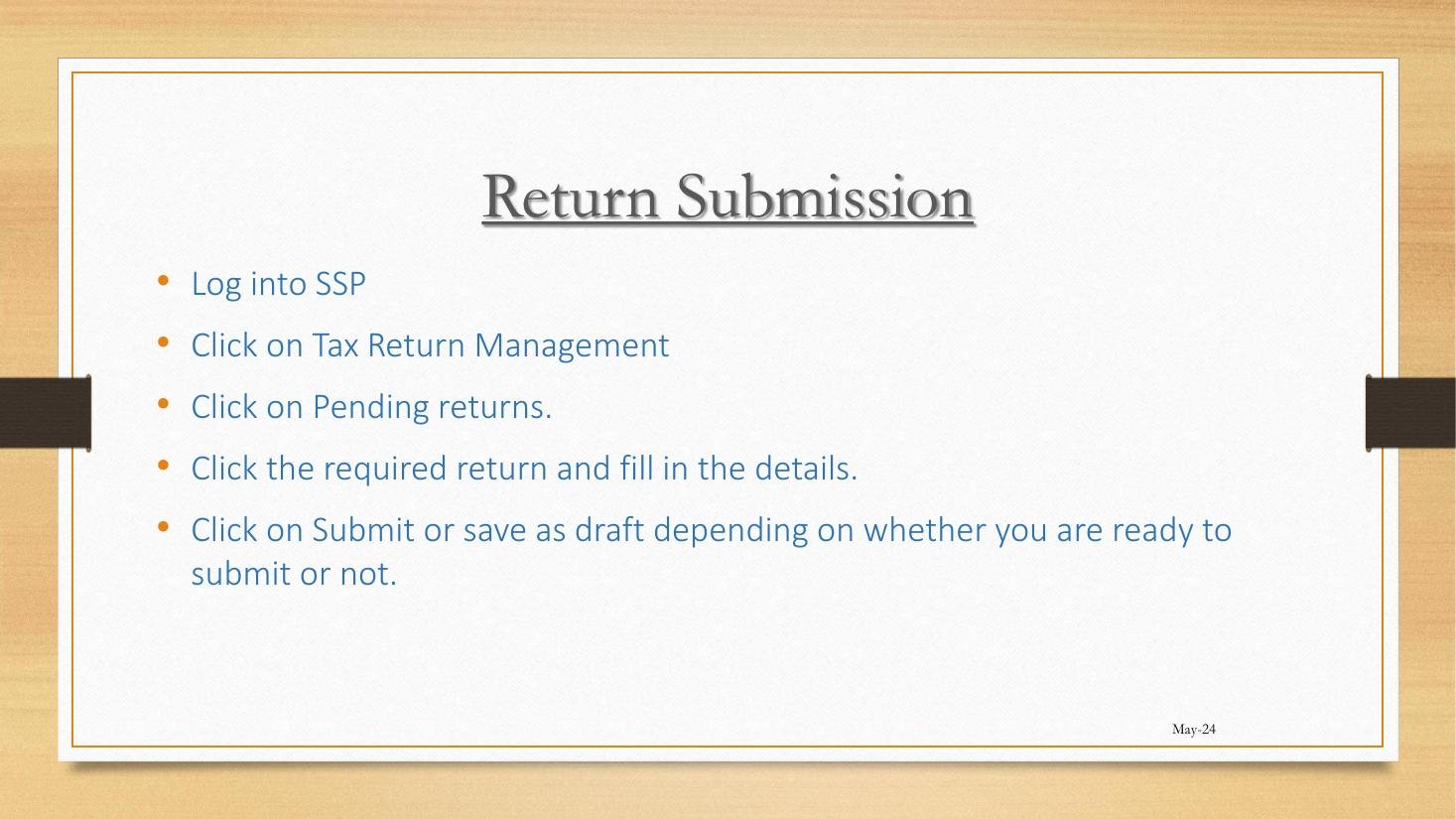
Return Submission steps from workshop
Figure 4.1.A — The five-step Return Submission workflow as taught in the May 2024 webinar.

1. The three return states

StateDefinitionImplications
PendingSystem-generated; not yet started or not yet submittedDeadline still running; no assessment yet
DraftStarted, partially completed, saved without submissionDeadline still running; data is preserved
SubmittedLodged; acknowledged by ZIMRA; assessment postedDeadline met; ledger updated; objection clock starts

2. The five-step workflow

  1. Login to SSP.
  2. Click Tax Return Management.
  3. Click Pending Returns.
  4. Click on the required return; complete the data fields.
  5. Click Submit, or Save as Draft if not yet ready.

3. The Pending Returns inbox

Pending Returns is the practitioner’s daily working list. Each row shows: tax type, period, due date, status, action button. Filter by tax type or by due date proximity.

4. Save as Draft — the safety net

Use Save as Draft when:

  • Data entry is incomplete and you need to gather more information.
  • The return is for review before submission.
  • You want to attach supporting documentation later.

Drafts are private to the firm/TIN; ZIMRA does not see them. Drafts persist indefinitely but are best resolved within the period — abandoned Drafts cause confusion at month-end.

5. Submit — the irrevocable step

Click Submit; the system runs validation; on success, an acknowledgement is generated showing reference number, date, and time. The return moves from Pending/Draft to Submitted Returns.

6. After submission — what happens automatically

  1. Acknowledgement is generated (downloadable PDF).
  2. Assessment is posted to the Tax Type Report (Lesson 7.2).
  3. Single Account balance updates with any new liability or refund (Lesson 6.1).
  4. Notification dispatched to the Notifications inbox.
  5. 30-day objection clock starts under section 62 ITA.

7. The submission lifecycle — one diagram

flowchart LR A["System generates Pending Return"] --> B["User opens, fills data"] B --> C{"Ready to submit?"} C -- No --> D["Save as Draft"] D --> B C -- Yes --> E["Submit"] E --> F["Validation"] F -- Pass --> G["Acknowledgement issued"] F -- Fail --> B G --> H["Assessment posted to Tax Type Report"] H --> I["Single Account updated"] I --> J["Notification to inbox"] J --> K["30-day objection clock starts"]

8. Validation errors

The system blocks submission for: missing mandatory fields, currency mismatches, attachment errors, total-mismatch (e.g., taxable supplies + zero-rated supplies do not equal turnover). Read the validation message; correct; retry.

9. Acknowledgement: the proof of submission

The acknowledgement PDF is the legal evidence of submission. Save a copy outside the SSP (in a firm document repository) for audit-trail purposes.

10. The deadline rule

Submission must happen before the prescribed deadline. Drafts saved on the deadline are not submissions. Plan to submit at least 2 working days before the deadline to absorb system-availability risk.

D. Real-World Applicability

1. The submission-day playbook

  • Open Pending Returns and identify the return for action.
  • Gather supporting data (trial balance, payroll register, VAT input/output schedules).
  • Open the return; fill in the data; save as Draft.
  • Conduct internal review (a second pair of eyes).
  • Resolve any review comments.
  • Submit at least 2 working days before deadline.
  • Download the acknowledgement; file in firm repository.
  • Confirm Tax Type Report shows the assessment posted.
  • Action any payment via Single Account if liability exists.

2. Lily’s monthly VAT return

Lily files her VAT Category C monthly return on or before the 25th. Her routine: pull sales register from her POS; reconcile to bank; complete the return on SSP; save as Draft; review next morning; submit by the 22nd. Any liability is paid via Single Account same day.

3. Cairns Foods’ multiple returns

The Tax Manager runs a return-filing calendar: PAYE by the 10th, VAT by the 25th, withholding tax by the 10th, provisional tax (ITF 12B) quarterly. Each return follows the same five-step pattern; the differentiator is the data and the supporting attachments.

4. The agent’s 20-client routine

An agent serving 20 clients on monthly cycles runs a parallel batch each month: switch to Client 1, file all due returns, switch to Client 2, repeat. The Calendar module aggregates due dates across clients (Lesson 1.2 noted this).

E. Case Law Integration

1. Commissioner-General v. Borrowdale Holdings (Pvt) Ltd (Special Court 2022)

A taxpayer saved a return as Draft on the day of the deadline and submitted three days later. ZIMRA assessed late-submission penalty. The Special Court held that Save as Draft is not submission; the deadline is the submission cut-off. Penalty upheld.

2. Re Eastview Suppliers (Special Court 2023) — the system-unavailability defence

The taxpayer argued that SSP unavailability on the deadline justified a one-day delay. The court accepted the defence on documented evidence: a help-desk ticket logged before the deadline, plus submission within 24 hours of restoration.

3. The objection clock starting

Section 62 ITA gives 30 days from the date of assessment notice to object. The notice issues immediately on submission; the clock therefore starts the moment of acknowledgement, not the date of any subsequent administrative letter.

F. Common Pitfalls

1. Treating Save as Draft as submission

Borrowdale Holdings (2022). Submit, don’t draft, on the deadline.

2. Submitting at 11pm on the deadline

Network or system glitches at the deadline are unforgiving. Submit 2 working days early.

3. Not downloading the acknowledgement

If the SSP later loses the record (rare but possible), the acknowledgement is your evidence.

4. Multiple users editing the same Draft

Concurrent edits collide. Fix: assign each Draft to one Assignee.

5. Ignoring validation errors

Forcing through validation by leaving fields zeroed creates an inaccurate return. Fix: read every error message; correct properly.

6. Not reconciling to the Tax Type Report after submission

The submitted figure should match the assessment posted. Discrepancy = system glitch or validation issue. Fix: always confirm post-submission.

G. Knowledge Check

Question 1

Distinguish Pending, Draft, and Submitted returns.

Question 2

Walk through the five-step submission workflow.

Question 3 — Scenario

You complete a VAT return at 4pm on the deadline day, but the SSP is rejecting submissions due to a system issue. What do you do?

Question 4 — Scenario

You submit a return; the acknowledgement issues; you then realise you put a wrong figure in box 7. What do you do?

Question 5

From what point does the section 62 ITA 30-day objection clock run, and what is the practical evidence of that point?

H. Quiz Answers with Explanations

Answer 1

Pending = system-generated, not yet started/submitted. Draft = started, partially completed, saved. Submitted = lodged, acknowledged, assessed. The deadline runs against Pending and Draft both; only Submitted stops the clock.

Answer 2

(1) Login. (2) Tax Return Management. (3) Pending Returns. (4) Open and complete. (5) Submit (or Save as Draft).

Answer 3

Steps from Re Eastview Suppliers (2023): (1) Log a help-desk ticket immediately documenting the time and error message. (2) Email the firm’s ZIMRA contact noting the submission attempt and the issue. (3) Save the return as Draft so data is preserved. (4) Submit as soon as the system is restored, ideally within 24 hours. (5) Keep the help-desk ticket and email evidence for any subsequent objection. Do not assume the deadline is automatically extended; document the unavailability and rely on it as a defence.

Answer 4

Submission is irrevocable, but the figure is correctable. Two paths: (a) use the Amend workflow on Submitted Returns (Lesson 4.3) for current-period correction; (b) await the assessment notice and lodge an objection within 30 days under section 62 ITA. The Amend workflow is faster and cleaner for clear errors.

Answer 5

The clock runs from the date of the assessment notice issued on submission. The acknowledgement carries the date and time and is the practical evidence. The objection must be lodged within 30 days of that date.

I. Key Takeaways

  • Three states: Pending, Draft, Submitted.
  • Five-step workflow: Tax Return Management → Pending Returns → open → fill → Submit.
  • Save as Draft is preservation, not submission (Borrowdale Holdings 2022).
  • System-unavailability defence works when documented (Re Eastview Suppliers 2023).
  • Always download the acknowledgement.
  • 30-day objection clock starts on submission/assessment date (s. 62 ITA).
  • Continuity: Lesson 4.2 next deals with PAYE returns specifically — the most error-prone return type for SMEs.
TaRMS Essentials Lesson 1.1
Introduction to TaRMS
TaRMS Essentials Lesson 1.2
Logging In & Navigation
TaRMS Essentials Lesson 1.3
TIN & VAT Certificates
TaRMS Essentials Lesson 2.1
Taxpayer Profile
TaRMS Essentials Lesson 2.2
VAT Application
TaRMS Essentials Lesson 2.3
Tax Type Deregistration
TaRMS Essentials Lesson 2.4
TIN Deregistration
TaRMS Essentials Lesson 3.1
Tax Agent Registration
TaRMS Essentials Lesson 3.2
Tax Agent Licence
TaRMS Essentials Lesson 3.3
Assigning Tax Agents
TaRMS Essentials Lesson 3.4
Roles & Assignees
TaRMS Essentials Lesson 4.1
Return Submission
TaRMS Essentials Lesson 4.2
PAYE Return Submission
TaRMS Essentials Lesson 4.3
Amending Current Returns
TaRMS Essentials Lesson 4.4
Filing Past Returns
TaRMS Essentials Lesson 5.1
Automatic Tax Clearance
TaRMS Essentials Lesson 5.2
Manual Tax Clearance
TaRMS Essentials Lesson 6.1
The Single Account
TaRMS Essentials Lesson 6.2
Changing Single Account Bank
TaRMS Essentials Lesson 6.3
Single Account Transactions
TaRMS Essentials Lesson 7.1
Summary Report
TaRMS Essentials Lesson 7.2
Tax Type Report
TaRMS Essentials Lesson 7.3
Assessment Notices
TaRMS Essentials Lesson 8.1
VAT Compliance Workflow
TaRMS Essentials Lesson 8.2
PAYE Compliance Workflow
TaRMS Essentials Lesson 8.3
Common Pitfalls
TaRMS Essentials Lesson 8.4
Monthly & Quarterly Routine
Full Course Menu
TaRMS Essentials
TaxTami TaxTami

Zimbabwe's leading tax education platform, making Zimbabwean tax law simple for students, professionals and business owners.

Courses

  • Income Tax
  • Value Added Tax
  • Capital Gains Tax
  • Debt Management
  • TaRMS Essentials

Company

  • About
  • Team
  • Blog
  • Contact Us

Resources

  • Help
  • Support
  • Sitemap
  • Community

© TaxTami. All rights reserved.

  • Terms and Conditions
  • Privacy Policy