The Summary Report is a Tax Manager’s first screen each morning. It aggregates the consolidated position across every registered tax head and both currencies, and surfaces any non-zero balance that requires attention. Lessons 7.2 and 7.3 then drill into the underlying detail.

TaRMS Essentials Lesson 7.1
The Summary Report
The single-screen consolidated view of every taxpayer obligation across every tax head and both currencies — the screen a Tax Manager looks at first thing every morning.
1
Executive summary
What the Summary Report aggregates and how it relates to the Tax Type Report and Assessment Notices.
2
Lesson content
Workflow, columns, currency segregation, and reading non-zero balances.
3
Assessment & policy notes
Common Summary-Report misreadings and a daily-monitoring playbook.



A. Lesson Context: The Daily Health Check
B. Legislative Framework
1. Section 51 ITA — record retention
The Summary Report is part of the digital record retained by ZIMRA.
2. Section 80B — tax clearance dependence
An automatic tax clearance request consults the Summary Report’s zero-balance condition.
3. Section 79A — allocation logic feeding the Summary
The priority rules in s. 79A determine how Single Account inflows reduce the balances visible on the Summary.
C. Detailed Conceptual Explanation
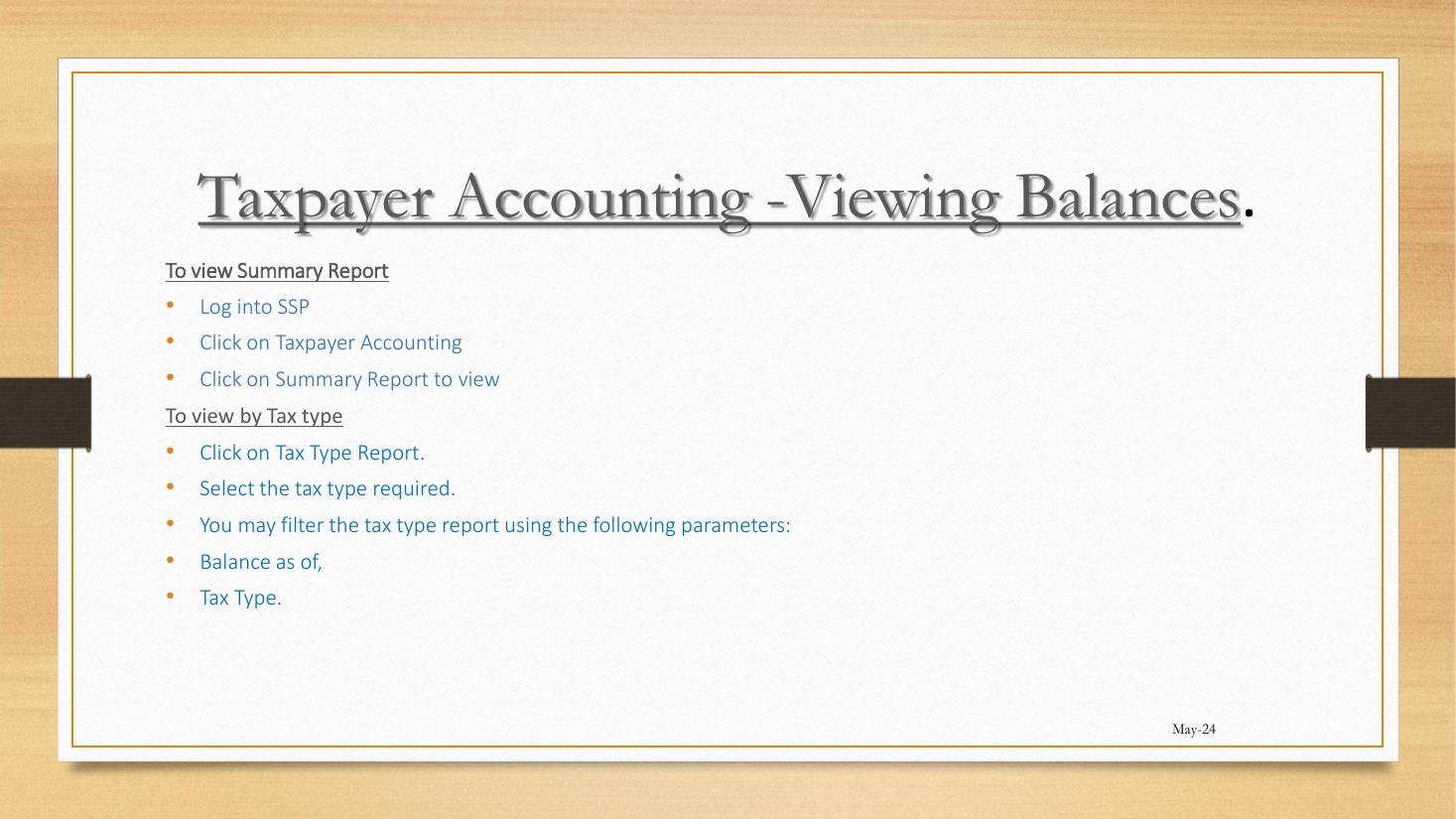
1. Workflow
- Login to SSP.
- Click Taxpayer Accounting.
- Click Summary Report.
- The consolidated view loads.
2. What the Summary aggregates
| Column | Meaning |
|---|---|
| Tax Type | Each registered head listed. |
| Principal Amount Due | Substantive tax liability. |
| Overdue Amount Due | Past-due principal. |
| Interest | Accrued interest under prescribed rate. |
| Penalties | Civil penalties levied. |
| Total Payable Amount | Sum of the above. |
| (All split by currency) | ZWG and USD sub-columns. |
3. Reading a non-zero balance
- If only Principal: Recent assessment, not yet paid — pay if due.
- If Overdue: Past-due liability — immediate attention; interest accruing.
- If Interest only: Past-due that has been recently part-settled; ensure full settlement.
- If Penalty: Compliance lapse triggered penalty; consider objection if disputed.
4. Relationship to other reports
flowchart LR
RET["Returns submitted"] --> ASS["Assessment Notices"]
ASS --> TYR["Tax Type Report"]
TYR --> SUM["Summary Report"]
SA["Single Account payments"] --> SUM
5. The daily-monitoring playbook
- Open Summary Report.
- Note any non-zero rows.
- For each non-zero, drill via Tax Type Report (Lesson 7.2) for detail.
- For surprising assessments, open Assessment Notices (Lesson 7.3).
- Action: pay, object, or query.
D. Real-World Applicability
1. The Tax Manager’s morning
5-minute scan of Summary Report; any non-zero is investigated immediately.
2. The agent’s portfolio view
For each client TIN switched to, glance at Summary; aggregate any concerning balances into a portfolio-level briefing.
3. The pre-clearance check
Before requesting Tax Clearance (Module 5), confirm Summary shows zero across all heads.
E. Case Law Integration
1. Evidentiary use
The Summary Report is a state document admissible under section 4 Civil Evidence Act. Practitioners include screenshots in objection bundles.
2. Section 47 ITA reach-back
The Summary shows current balances, not historical; for reach-back work, use Tax Type Report with date filter.
F. Common Pitfalls
1. Reading totals across currencies
ZWG and USD do not net. Fix: read each currency separately.
2. Treating zero Summary as full compliance
Summary captures balance, not unfiled returns. Fix: check Pending Returns separately.
3. Acting on Summary without drilling
Aggregate hides drivers. Fix: use Tax Type Report for detail.
G. Knowledge Check
Question 1
What columns does the Summary Report carry?
Question 2
Distinguish a non-zero Principal balance from a non-zero Penalty balance.
Question 3 — Scenario
Summary shows USD 0 across all heads, but Pending Returns shows 1 unfiled VAT return. Are you compliant?
H. Quiz Answers with Explanations
Answer 1
Tax Type, Principal, Overdue, Interest, Penalties, Total Payable — all per currency.
Answer 2
Principal = substantive tax assessed but unpaid. Penalty = civil-penalty levy for compliance lapse. Both require action; the latter may be the basis for objection if penalty was wrongly applied.
Answer 3
No. Compliance is two-sided: balance and filing. Zero balance with unfiled returns is not full compliance. Tax Clearance will be refused. Fix: file the VAT return; balance may then update if the return generates liability.
I. Key Takeaways
- Summary Report = consolidated daily health check.
- Six columns, two currencies; never net across currencies.
- Pair with Pending Returns for full compliance picture.
- Drill via Tax Type Report (Lesson 7.2) for detail.
- Continuity: Lesson 7.2 covers the Tax Type Report.