



• info@taxtami.com
  • +263 772 226 466
  • | |
  • Our Social
  • Home
  • Domestic Tax Courses
    • Income Tax Courses
    • Value Added Tax Courses (VAT)
    • Capital Gains Tax (CGT)
    • ZIMRA Debt Management Courses
  • TaRMS Essentials
    • Course Menu
    • TaRMS Getting Started
    • TaRMS Taxpayer Profile
    • TaRMS Tax Agents & Assignees
    • TaRMS Tax Return Management
    • TaRMS Tax Clearance
    • TaRMS Payments & Single Account
    • TaRMS Taxpayer Accounting
    • TaRMS Capstone Workflows
  • Reve-News
    • Public Notice Updates
    • Detailed Tax Analysis
  • About Us
  • Contact
TaRMS Essentials Lesson 3.4 Roles and Assignees How a Tax Agent firm or a corporate finance team structures internal access on the SSP — building Roles, creating Assignees, granting least-privilege permissions, and revoking on staff exit.
1

Executive summary

The Roles concept — named bundles of module-permissions — and why every firm should design at least four (Director, Manager, Clerk, Read-only).

2

Lesson content

The Assignee creation workflow, including the SSP-account prerequisite and the day-one onboarding checklist.

3

Assessment & policy notes

Pitfalls in role design, the offboarding checklist, and a quarterly access-review cadence.

Executive summary
Lesson content
Assessment
A. Context B. Legislative C. Detailed D. Real-World E. Case Law F. Pitfalls G. Knowledge Check H. Quiz Answers I. Takeaways

A. Lesson Context: Internal Controls Inside the Firm

Lessons 3.1–3.3 dealt with the relationship between client and agent firm. Lesson 3.4 turns inward: how the firm structures itself within TaRMS so that an articled clerk can prepare returns, a manager can review them, and a director can submit, without any of the three using a shared password.

The same Roles-and-Assignees architecture applies to corporate finance teams — an in-house tax department of six people structures itself in exactly the same way. Module 3 is therefore not just for tax agents; it is for every organisation that has more than one person touching ZIMRA filings.
B. Legislative Framework

1. SI 125 of 2023, Reg. 6 — agent responsibility for staff actions

The licensed agent firm is liable for actions taken by its Assignees. The Assignee mechanism is therefore not a way of distributing legal liability; it is a way of distributing access.

2. Cyber and Data Protection Act, sections 7 and 16

The least-privilege principle in section 7 (data-protection by design) and the prohibition on unauthorised access in section 16 underwrite the discipline of granting only the access each Assignee needs.

3. Public Notice on TaRMS Migration

Mandates individual SSP accounts. Each Assignee must have their own login.

4. Section 80 ITA

A return submitted under an Assignee’s credentials but containing false statements binds the agent firm AND the named Assignee.

C. Detailed Conceptual Explanation

Assignee Management Roles workflow
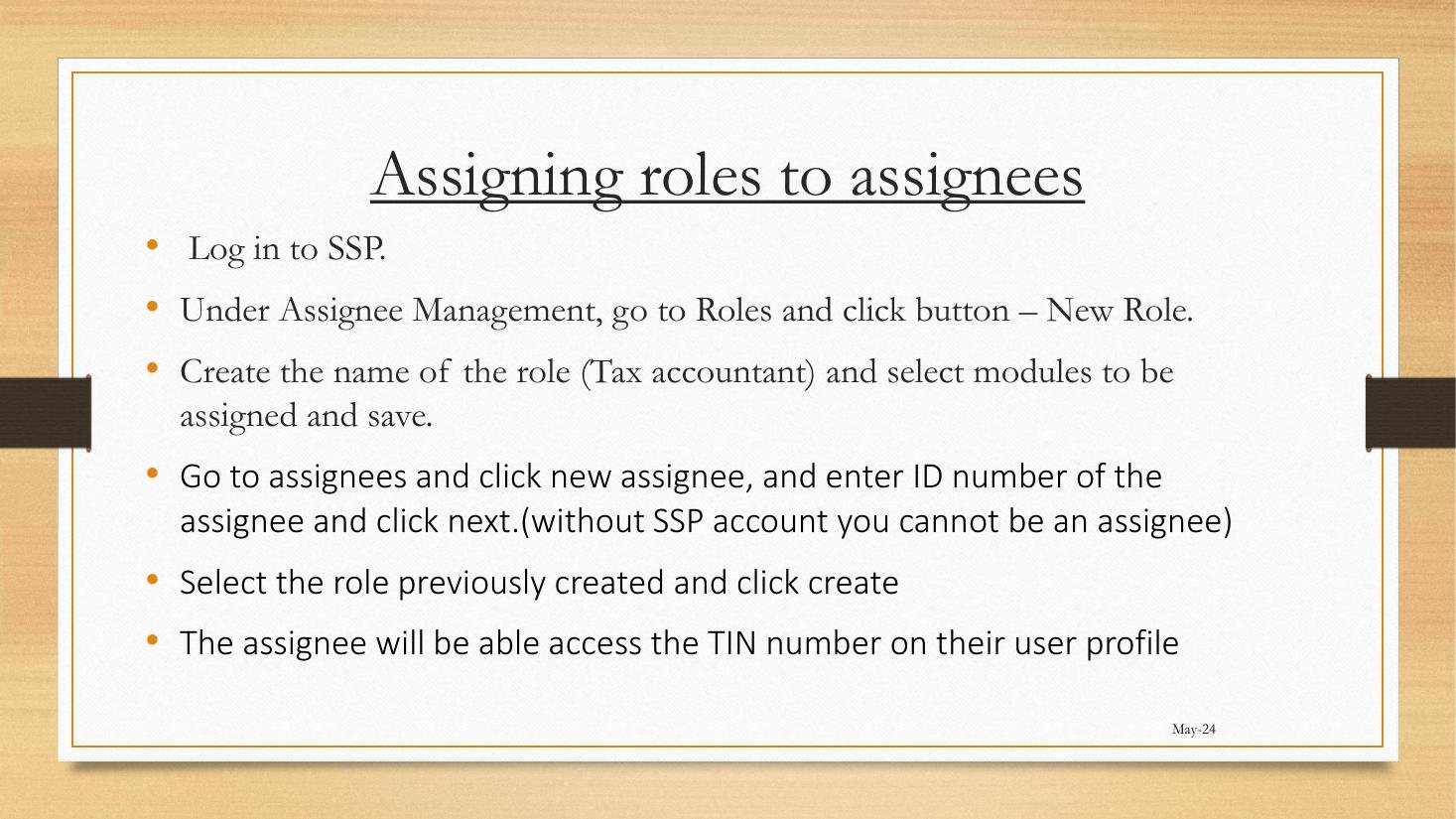
Figure 3.4.A — The Assigning Roles to Assignees workflow as articulated in the May 2024 webinar.

1. Roles vs. Assignees

A Role is a named bundle of module permissions (e.g., “Tax Accountant” = Tax Return Management + Taxpayer Accounting + Taxpayers Certificates). An Assignee is a natural person granted one or more Roles on the firm’s licence (or on a corporate’s TIN). Roles are reusable; Assignees are individuals.

2. Designing Roles — the four-tier template

RoleModules grantedTypical staff
Director / PartnerAll modules including Assignee ManagementFirm partners
Tax ManagerAll modules except Assignee ManagementSenior managers
Returns ClerkTax Return Management (write); Taxpayer Accounting (read)Junior staff preparing returns
Read-only ReviewerAll modules read-onlyAuditors, second-opinion reviewers

3. The workflow — create a Role

  1. Login to SSP under firm/corporate TIN.
  2. Click Assignee Management → Roles → New Role.
  3. Name the Role (e.g., “Tax Accountant”).
  4. Tick the modules to grant; for each module, optionally tick read or write.
  5. Save.

4. The workflow — create an Assignee

  1. Click Assignee Management → Assignees → New Assignee.
  2. Enter the Assignee’s ID number.
  3. The system validates that the Assignee already holds an SSP account (without one, they cannot be an Assignee).
  4. Select the Role(s) to grant.
  5. Click Create.
  6. The Assignee can now access the firm’s licence (or the corporate’s TIN) when they next log in to their personal SSP account.

5. Removing an Assignee

  1. Assignees list → select the user → Remove.
  2. Effective immediately on next refresh.

6. Editing default roles

The default Role granted to a new Assignee can be edited via the Roles tab. Best practice: edit the default to be the least-permissive Role (e.g., Read-only Reviewer) so accidental over-granting is prevented.

7. Access-review cadence

Quarterly review the Assignees list against the firm’s active staff register. Remove leavers, downgrade staff who have moved roles, ensure each Role still corresponds to a real job description.

D. Real-World Applicability

1. The mid-sized firm setup

Day one of practice for a 4-partner, 12-staff firm:

  1. Each partner and staff member opens their own personal SSP account.
  2. The firm logs in under its licensed TIN; creates the four-tier Roles per Section C2.
  3. Each Assignee is added with the appropriate Role.
  4. The firm communicates to staff: “always log in under your own credentials; never share.”

2. The corporate finance team setup

Same architecture, but the licensed TIN is the corporate’s own TIN, and the “firm” in this case is the corporate. The Tax Manager creates Roles; staff members are Assignees.

3. The offboarding checklist

  • On exit announcement: schedule the Assignee removal for the last day of work, 17:00.
  • Last-day morning: Tax Manager reviews any in-flight Drafts owned by the leaver and reassigns to another Assignee.
  • Last-day end of day: remove the Assignee.
  • Next-day morning: confirm the History tab shows the removal timestamp.

4. The role-redesign trigger

When the firm grows past 30 people, the four-tier template becomes too coarse. Common evolution: split “Returns Clerk” into “PAYE Clerk”, “VAT Clerk”, and “Income Tax Clerk” for further specialisation.

E. Case Law Integration

1. Section 80 ITA — named-individual liability

A return submitted by an Assignee with a false statement attaches liability to both the Assignee and the firm. The Assignee cannot hide behind the firm; the firm cannot disclaim the Assignee’s actions.

2. Re Bulawayo Engineering — scope-of-role disputes

An Assignee argued that a particular submission fell outside her Role’s permissions and therefore the firm was responsible. The Magistrates’ Court held that if the Assignee was technically able to make the submission, scope arguments fail; the SSP’s Role configuration should match the firm’s real internal authority structure.

3. The data-controller responsibility

The firm is the data controller of all client data accessed by its Assignees; section 7 of the Cyber Act imposes the obligation to design access on a least-privilege basis. Failure to do so is a data-protection breach.

F. Common Pitfalls

1. Single shared firm credential

Unlawful under Public Notice on TaRMS Migration. Fix: individual logins for each Assignee.

2. Over-granted Roles

Returns Clerks given Director permissions. Fix: least privilege; quarterly review.

3. Forgetting to remove leavers

Assignees retain access post-departure. Fix: exit-day removal as a non-negotiable HR step.

4. Role names that do not match real authority

SSP Role “Manager” granted to a junior. Fix: Role names should mirror the org chart.

5. Role drift

Roles accrue permissions over time as exceptions are made. Fix: annual full-redesign.

6. Allowing departing staff to know the password

Even with SSP individual logins, shared passwords for systems-of-record (e.g., the firm’s practice-management software) leak indirectly. Fix: rotate all firm credentials on staff departure.

G. Knowledge Check

Question 1

Distinguish a Role from an Assignee.

Question 2

Walk through the workflow to create a Role and to create an Assignee, including the prerequisites for the Assignee.

Question 3 — Scenario

A 4-partner firm with 12 staff is setting up TaRMS access. Design the four-tier Role template and identify which staff member fits each Role.

Question 4 — Scenario

An Assignee leaves on 30 April 2026. What three actions must the firm complete before close of business that day?

Question 5

What does the Cyber Act’s least-privilege principle mean for Role design?

H. Quiz Answers with Explanations

Answer 1

A Role is a named, reusable bundle of module permissions (e.g., Tax Manager = all modules except Assignee Management). An Assignee is an individual natural person who holds one or more Roles on the firm’s licence or on a corporate’s TIN. Roles are templates; Assignees are people.

Answer 2

Create Role: Assignee Management → Roles → New Role → name → tick modules → save. Create Assignee: Assignees → New Assignee → enter ID number → system validates SSP-account exists → select Role → Create. Prerequisite: Assignee must have their own personal SSP account before being added.

Answer 3

Director (4 partners), Tax Manager (2 senior managers, no partner status), Returns Clerk (8 junior staff handling routine returns), Read-only Reviewer (2 staff providing internal review). Each individual is added once with the appropriate Role; the partners can also hold the Director Role on multiple client TINs through the Tax Agent assignment workflow (Lesson 3.3).

Answer 4

(1) Reassign in-flight Drafts to another Assignee. (2) Remove the Assignee from Assignee Management → Assignees. (3) Audit the History tab for the previous 90 days for any anomalous activity by the leaver. Plus: rotate any shared credentials the leaver may have known.

Answer 5

Section 7 of the Cyber and Data Protection Act requires data controllers to apply privacy-by-design measures, including access controls. In Role design, this means each Role grants only the permissions strictly necessary for the job. Returns Clerks should not have Assignee Management; Read-only Reviewers should not have write permissions. Quarterly review enforces the principle.

I. Key Takeaways

  • Roles are reusable permission bundles; Assignees are people.
  • Four-tier template: Director, Tax Manager, Returns Clerk, Read-only Reviewer.
  • Each Assignee must hold their own SSP login.
  • Section 7 Cyber Act = least-privilege design.
  • Section 80 ITA = both Assignee and firm bound by submissions.
  • Quarterly access review; offboarding-day removal.
  • Continuity: Module 4 next opens with the substantive return-filing workflow on the SSP.
TaRMS Essentials Lesson 1.1
Introduction to TaRMS
TaRMS Essentials Lesson 1.2
Logging In & Navigation
TaRMS Essentials Lesson 1.3
TIN & VAT Certificates
TaRMS Essentials Lesson 2.1
Taxpayer Profile
TaRMS Essentials Lesson 2.2
VAT Application
TaRMS Essentials Lesson 2.3
Tax Type Deregistration
TaRMS Essentials Lesson 2.4
TIN Deregistration
TaRMS Essentials Lesson 3.1
Tax Agent Registration
TaRMS Essentials Lesson 3.2
Tax Agent Licence
TaRMS Essentials Lesson 3.3
Assigning Tax Agents
TaRMS Essentials Lesson 3.4
Roles & Assignees
TaRMS Essentials Lesson 4.1
Return Submission
TaRMS Essentials Lesson 4.2
PAYE Return Submission
TaRMS Essentials Lesson 4.3
Amending Current Returns
TaRMS Essentials Lesson 4.4
Filing Past Returns
TaRMS Essentials Lesson 5.1
Automatic Tax Clearance
TaRMS Essentials Lesson 5.2
Manual Tax Clearance
TaRMS Essentials Lesson 6.1
The Single Account
TaRMS Essentials Lesson 6.2
Changing Single Account Bank
TaRMS Essentials Lesson 6.3
Single Account Transactions
TaRMS Essentials Lesson 7.1
Summary Report
TaRMS Essentials Lesson 7.2
Tax Type Report
TaRMS Essentials Lesson 7.3
Assessment Notices
TaRMS Essentials Lesson 8.1
VAT Compliance Workflow
TaRMS Essentials Lesson 8.2
PAYE Compliance Workflow
TaRMS Essentials Lesson 8.3
Common Pitfalls
TaRMS Essentials Lesson 8.4
Monthly & Quarterly Routine
Full Course Menu
TaRMS Essentials
TaxTami TaxTami

Zimbabwe's leading tax education platform, making Zimbabwean tax law simple for students, professionals and business owners.

Courses

  • Income Tax
  • Value Added Tax
  • Capital Gains Tax
  • Debt Management
  • TaRMS Essentials

Company

  • About
  • Team
  • Blog
  • Contact Us

Resources

  • Help
  • Support
  • Sitemap
  • Community

© TaxTami. All rights reserved.

  • Terms and Conditions
  • Privacy Policy