



• info@taxtami.com
  • +263 772 226 466
  • | |
  • Our Social
  • Home
  • Domestic Tax Courses
    • Income Tax Courses
    • Value Added Tax Courses (VAT)
    • Capital Gains Tax (CGT)
    • ZIMRA Debt Management Courses
  • TaRMS Essentials
    • Course Menu
    • TaRMS Getting Started
    • TaRMS Taxpayer Profile
    • TaRMS Tax Agents & Assignees
    • TaRMS Tax Return Management
    • TaRMS Tax Clearance
    • TaRMS Payments & Single Account
    • TaRMS Taxpayer Accounting
    • TaRMS Capstone Workflows
  • Reve-News
    • Public Notice Updates
    • Detailed Tax Analysis
  • About Us
  • Contact
TaRMS Essentials Lesson 2.1 Anatomy of the Taxpayer Profile Eight tabs, one source of truth. The Taxpayer Profile is the master record from which every TaRMS workflow draws — this lesson dissects each tab, explains which downstream module reads from each, and shows how to keep the profile clean.
1

Executive summary

The eight tabs of the Profile (General Information, Tax Type, Partnership, Business Details, Branches, Authorised Persons, Tax Agent Activity, History) and their data lineage.

2

Lesson content

How each tab connects to the rest of TaRMS — returns generated, certificates issued, and audit trails preserved.

3

Assessment & policy notes

Common profile-hygiene pitfalls, the History tab as evidentiary tool, and a quarterly profile-audit checklist.

Executive summary
Lesson content
Assessment
A. Context B. Legislative C. Detailed D. Real-World E. Case Law F. Pitfalls G. Knowledge Check H. Quiz Answers I. Takeaways

A. Lesson Context: Why Profile Hygiene is Compliance Hygiene

If the TIN is the spinal column of TaRMS, the Taxpayer Profile is the nervous system. Every return generated, every certificate issued, every assessment posted, every objection lodged, every refund paid — all of them draw on data held in the Profile. A defect in the Profile cascades silently into every dependent process. This is why Lesson 2.1 deserves its own deep treatment.

The Profile is not exotic; it is administrative plumbing. But the practitioner who can navigate the eight tabs blindfolded, who knows which tab feeds which workflow, and who treats the History tab as a forensic record, is the practitioner whose clients never receive penalty letters for trivial reasons.

Mental model: The Profile is the “customer master file” of an ERP system. If it is wrong, every transaction downstream is wrong.
B. Legislative Framework

1. Section 51 Income Tax Act — record retention

Every taxpayer must keep records sufficient to determine tax liability for at least six years. The Taxpayer Profile is the canonical electronic record on ZIMRA’s side; the taxpayer is still obliged to retain underlying source documents.

2. Section 23(11) VAT Act — 21-day notification of changes

Any change in registration particulars must be notified to ZIMRA within 21 days. Section 23(12) imposes a fine for breach. The SSP’s Change of Details workflow on the Profile is the modern compliance route.

3. Income Tax Act s. 25 — the duty to register

Section 25 imposes a duty on every person liable to tax to register with ZIMRA. The Profile evidences that registration.

4. Cyber and Data Protection Act — the personal data overlay

The Profile holds personal data (IDs, addresses, banking details) which the Cyber and Data Protection Act categorises as data ZIMRA holds as a controller. Section 7 obliges ZIMRA to maintain accurate, up-to-date records — the obligation runs both ways: a taxpayer who knows their Profile is wrong has a corresponding duty to flag it.

5. Practice Note — the History tab as audit trail

ZIMRA’s audit-procedure manual treats the History tab as a primary forensic source in any compliance audit, alongside the underlying returns. Every change to the Profile is timestamped and attributed to the user who made it.

C. Detailed Conceptual Explanation: The Eight Tabs

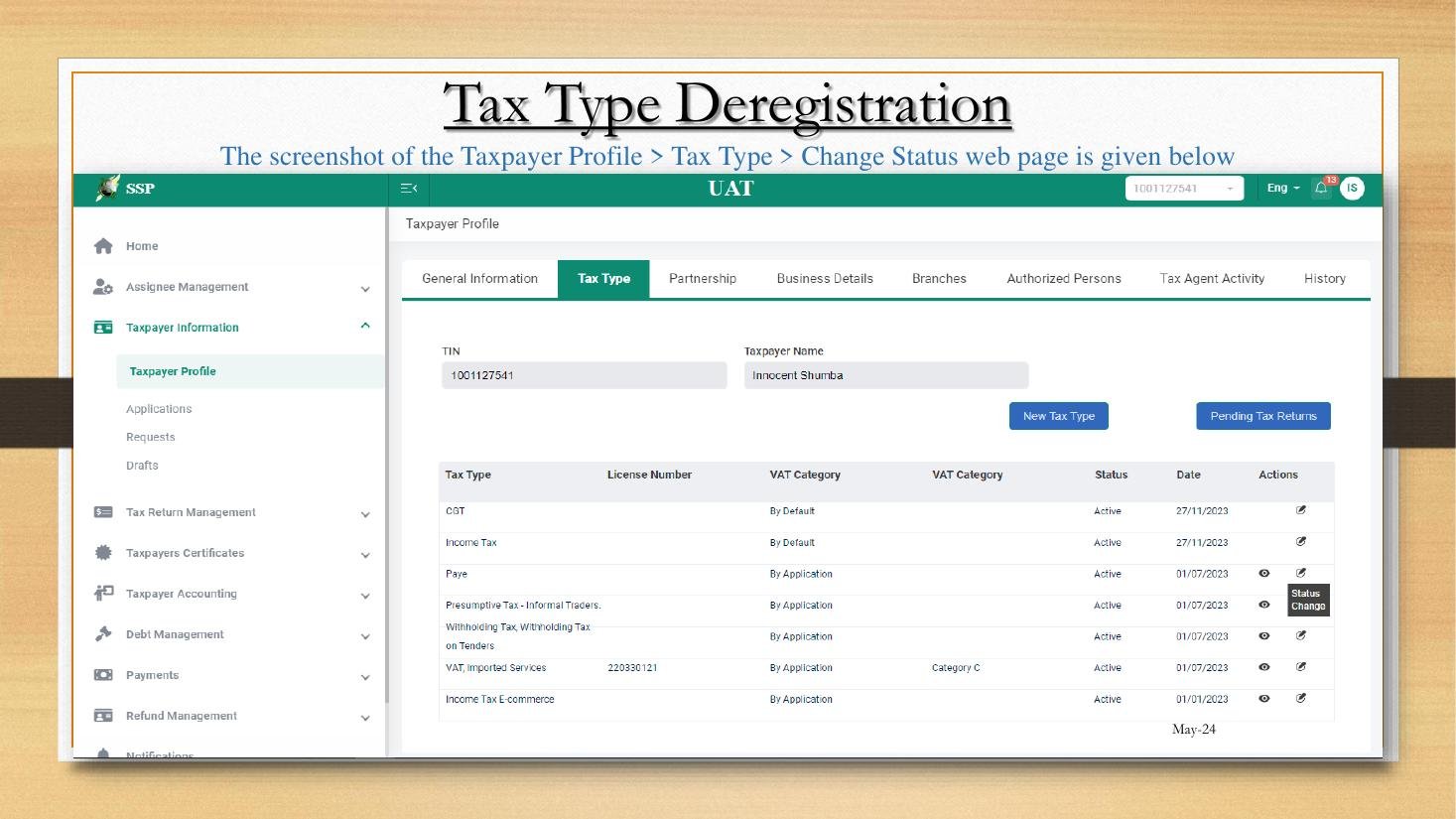
Taxpayer Profile Tax Type tab
Figure 2.1.A — The Taxpayer Profile, with the eight tab strip visible at the top. The Tax Type tab is selected, showing seven registered tax heads. Each row is its own lifecycle.

1. General Information

The headline tab. Holds: legal name, ID/registration number, contact email, mobile, postal and physical address, status (Active / Suspended / Deregistered), date of registration. This is the tab from which TIN and VAT Certificates are downloaded (Lesson 1.3) and from which the TIN Deregistration workflow is initiated (Lesson 2.4).

2. Tax Type

One row per registered tax head. The screenshot above shows seven types: CGT, Income Tax, PAYE, Presumptive Tax (Informal Traders), Withholding Tax (Tenders), VAT (Imported Services, Category C), and Income Tax E-commerce. Each row carries:

  • License Number (for tax heads that require one, e.g., VAT)
  • VAT Category (where applicable)
  • Status (Active / Pending / Deregistered)
  • Effective Date
  • Actions column with View and Status Change icons

From this tab the user adds a new tax type (Lesson 2.2), changes the status of an existing one (Lesson 2.3), or initiates deregistration.

3. Partnership

For partnerships and joint ventures: lists each partner’s TIN, profit-sharing ratio, and the partnership effective date. Drives partnership-return generation (the partnership itself files an information return; partners file individual returns reflecting their share of profit).

4. Business Details

Captures the SIC industry code, principal business activity description, financial year-end, accounting period (monthly / quarterly / annual), and currency of account. The Business Details tab is the source of truth for which Income Tax return type appears (ITF 12C self-assessment vs. ITF 1 employment-income vs. presumptive). For VAT, it determines Category A/B/C/D.

5. Branches

Physical operating locations. Used most heavily by:

  • PAYE returns — where employees are split across branches, the return ascribes each employee to a branch.
  • VAT returns — output VAT is attributed to the branch of supply for analytics.
  • Audit risk targeting — ZIMRA officers can focus a visit on a specific branch.

6. Authorised Persons

The directors of a company, the public officer (the natural person designated under section 51 of the Income Tax Act as the company’s tax representative), and any other person authorised to sign on the entity’s behalf. Critical for:

  • Litigation — the public officer is the named respondent in tax appeals.
  • Compliance correspondence — ZIMRA addresses queries to the public officer.
  • Cessation events — deregistration, change of control, mergers.

7. Tax Agent Activity

Lists currently assigned Tax Agents (with licence numbers from SI 125 of 2023) and the assignees within each agent firm who can transact on the TIN. Drives delegated access (Module 3).

8. History

Audit log of every change to every other tab. Each row shows: timestamp, user (SSP login that made the change), tab affected, field affected, old value, new value. The History tab is the single most under-used tab among new TaRMS users and the single most valuable tab in any audit dispute.

9. Lineage diagram — what feeds what

flowchart LR GI["General Info"] --> TC["TIN Cert"] GI --> VC["VAT Cert"] GI --> CL["Tax Clearance"] TT["Tax Type"] --> RET["Returns generated"] TT --> TTRP["Tax Type Report"] BD["Business Details"] --> RET BD --> CAT["VAT Category"] BR["Branches"] --> RET AP["Authorised Persons"] --> CORR["ZIMRA correspondence"] TA["Tax Agent Activity"] --> ACCESS["Delegated access"] HIST["History"] --> AUDIT["Audit trail"]

10. Editing rules — what is self-service vs. what requires ZIMRA approval

FieldEdit channelApproval required?
Email, mobile, postal addressDirect edit on ProfileNo (self-service)
Physical address (place of business)Form REV 2 Change of DetailsYes — ZIMRA validation
Legal name (e.g., name change after marriage / company rename)Form REV 2 + supporting docsYes
Add a new tax typeNew Tax Type workflow (Lesson 2.2)Yes for VAT, CGT; no for some auto-registrations
Deregister a tax typeStatus Change workflow (Lesson 2.3)Yes
Authorised Persons (e.g., new director)Form REV 2 + CR14 / board resolutionYes
Branch additionForm REV 2 + lease / utilityYes
Bank account for Single AccountChange Single Account workflow (Lesson 6.2)Yes

D. Real-World Applicability

1. The quarterly profile audit (corporate)

A disciplined Tax Manager runs a 30-minute quarterly review:

  1. Open each Profile tab in turn.
  2. Cross-check Authorised Persons against the latest CR14 (changes in directors).
  3. Confirm Branches against the latest lease portfolio.
  4. Confirm Tax Type list against actual obligations (any heads that should be deregistered?).
  5. Open History; scan the previous 90 days for unexpected changes.

2. SME owner-operator

Lily reviews her Profile twice a year — at year-end and in mid-year. Her checks: (1) is the email still correct (a typo will starve her of OTPs); (2) is her physical address still her current premises; (3) has she crossed the VAT threshold (in which case she must add VAT under Lesson 2.2).

3. Tax agent due-diligence on a new client

When taking on a new client, the agent’s first action after the engagement letter is signed is to log into the client’s SSP and audit the Profile end-to-end. Defects are common — stale addresses, missing branches, dormant tax types — and the agent surfaces these to the client as remediation items.

4. The History tab in dispute

When ZIMRA proposes an additional assessment based on a perceived irregularity (e.g., a director added in 2023 not previously declared), the practitioner’s first move is to open History on the Authorised Persons tab and cross-reference the timestamp of the change against the audit query. Often the timestamp resolves the dispute outright.

5. Lifecycle: from registration to deregistration

StageProfile actionsLesson reference
RegistrationProfile created on issuance of TIN1.1, 1.2
OnboardingGeneral Info verified, Tax Types added2.2
OperatingBranches added, Authorised Persons updated, returns filed4.x
RestructuringForm REV 2 lodged for change of name / control / bank2.1, 6.2
Wind-downTax Types deregistered one by one2.3
ClosureTIN deregistered; Profile status set to Deregistered2.4

E. Case Law Integration

1. Estate of late J. Mukombero v. Commissioner-General, ZIMRA (Special Court 2017)

An estate dispute in which the History tab’s timestamp on a change of authorised person became the determinative evidence. The Special Court held that the SSP audit log, being maintained in the ordinary course of administrative business, is admissible under section 4 of the Civil Evidence Act and is presumed accurate absent rebutting evidence.

2. Adventure Communications — the agent must not edit Profile data without instruction

Reprised from Lesson 1.2: a tax agent acting on a client’s Profile without explicit written instruction is exposed under both section 80 ITA and the cyber legislation. Profile changes are material to liability; a careless agent who, for example, switches the principal business activity (changing VAT category) imposes new liabilities on the client.

3. The 21-day notification rule

Section 23(11) of the VAT Act and the parallel Income Tax Act provisions require notification of changes within 21 days. Late notification alone is not generally penalised; what is penalised is the consequential under-declaration that flows from outdated Profile data (e.g., a missed branch leading to under-declared output VAT).

F. Common Pitfalls

1. Stale email address

The most damaging Profile defect. OTPs go astray, ZIMRA notifications are missed, deadlines slip. Fix: on every Profile audit, send a test email to the address held; if no response, update.

2. Confusing the Authorised Person with the Public Officer

The Public Officer is the named natural person who carries the duty under section 51 ITA to act for the company. The Authorised Persons tab also lists directors, but the Public Officer is a single specific role. Fix: ensure the Profile clearly identifies which Authorised Person is the Public Officer.

3. Adding a branch without deregistering an old one

Multiple-branch entities sometimes have abandoned premises still listed. Fix: on quarterly audit, confirm every listed branch is still operating.

4. Editing the Profile post-engagement-end

A departing tax agent who continues to edit a former client’s Profile is in breach of mandate. Fix: the client revokes Tax Agent assignment immediately on disengagement (Module 3).

5. Failing to read the History tab

The History tab is invisible until clicked — many users never click it. Fix: add it to the quarterly audit checklist.

6. Treating the Profile as immutable

New users sometimes assume the Profile is set at registration and cannot change. Fix: read this lesson; the Profile is a living document.

G. Knowledge Check

Question 1

Name the eight tabs of the Taxpayer Profile and identify which tab is the source of truth for (a) PAYE return generation by branch, (b) directors of a company, (c) the SIC industry code that determines VAT Category, (d) every change ever made to the Profile.

Question 2

Distinguish self-service Profile edits from edits requiring ZIMRA approval. Give three examples of each.

Question 3 — Scenario

A company changes its name from Cairns Foods (Pvt) Ltd to Cairns & Co. (Pvt) Ltd, appoints two new directors, and moves headquarters to a new building. Which Profile tabs need to be updated and via which channel?

Question 4 — Scenario

ZIMRA issues an additional assessment alleging that the company under-declared VAT for branches it operated but did not declare. Where does the practitioner look first, and what evidence will they assemble?

Question 5

Why is the History tab evidentially privileged in disputes, and what is the relevant authority?

H. Quiz Answers with Explanations

Answer 1

The eight tabs: General Information, Tax Type, Partnership, Business Details, Branches, Authorised Persons, Tax Agent Activity, History.

  • (a) PAYE by branch → Branches (combined with Tax Type for the PAYE registration).
  • (b) Directors of a company → Authorised Persons.
  • (c) SIC industry code / VAT Category driver → Business Details.
  • (d) Audit log → History.

Answer 2

Self-service: email change, mobile change, postal address change. Approval required: physical address change (Form REV 2), legal name change (Form REV 2), addition of a new tax type (Lesson 2.2). The decisive line is whether ZIMRA needs to validate the change against external evidence (e.g., utility bill, CR14, registrar records) before posting it.

Answer 3

Three Profile tabs need updating; all three changes require ZIMRA approval via Form REV 2 / Change of Details:

  1. General Information — legal name change. Lodge via Taxpayer Information → Applications → Change of Details, attaching the certified copy of the change-of-name resolution and the registrar’s acknowledgement.
  2. Authorised Persons — two new directors. Same workflow, attaching the latest CR14 and director-resolution documents. Confirm which Authorised Person remains the Public Officer.
  3. Branches (or General Information physical address) — new HQ. Same workflow, attaching new lease and utility bill.

Practical sequencing: lodge all three in the same submission with a covering memorandum. ZIMRA’s validation typically takes 5–10 working days. During the validation window, returns can still be filed, but new Tax Type registrations and certificate downloads should wait.

Answer 4

Practitioner’s first three moves:

  1. Open Branches tab and capture the current list.
  2. Open History tab; filter for changes to Branches over the assessment period; record every addition and deletion with timestamp.
  3. Reconcile the History record against the company’s lease portfolio and the actual sale points used during the assessment period.

If the History shows the branch in question was indeed listed during the assessment period, the dispute likely turns on something other than Profile completeness (e.g., output VAT calculation). If the History shows the branch was added late, the practitioner needs to assemble lease evidence and a chronology to support an objection under section 62 ITA. Estate of late J. Mukombero (2017) is the leading authority on the evidential weight of the History tab.

Answer 5

The History tab is privileged evidentially because (i) it is maintained in the ordinary course of administrative business, satisfying the business-records exception to hearsay rules; (ii) it is admissible without further proof under section 4 of the Civil Evidence Act [Chapter 8:01]; and (iii) the Special Court accepted it as primary evidence in Estate of late J. Mukombero v. Commissioner-General, ZIMRA (Special Court 2017). Its accuracy is presumed absent rebuttal — the practical effect is that a taxpayer who wishes to dispute a History entry bears the evidentiary burden, not ZIMRA.

I. Key Takeaways

  • Eight Profile tabs, each feeding a downstream workflow. Memorise the lineage diagram in Section C9.
  • Self-service edits vs. approval-required edits — know the line.
  • The History tab is admissible evidence under section 4 Civil Evidence Act and was so treated in Estate of late J. Mukombero (2017).
  • Section 23(11) VAT Act and the parallel ITA provisions: notify ZIMRA of changes within 21 days.
  • Quarterly Profile audit is the cheapest insurance against avoidable assessments.
  • Form REV 2 / Change of Details is the workflow for any structural change.
  • Continuity: Lesson 2.2 next walks through adding a new tax type, using VAT registration as the worked example.
TaRMS Essentials Lesson 1.1
Introduction to TaRMS
TaRMS Essentials Lesson 1.2
Logging In & Navigation
TaRMS Essentials Lesson 1.3
TIN & VAT Certificates
TaRMS Essentials Lesson 2.1
Taxpayer Profile
TaRMS Essentials Lesson 2.2
VAT Application
TaRMS Essentials Lesson 2.3
Tax Type Deregistration
TaRMS Essentials Lesson 2.4
TIN Deregistration
TaRMS Essentials Lesson 3.1
Tax Agent Registration
TaRMS Essentials Lesson 3.2
Tax Agent Licence
TaRMS Essentials Lesson 3.3
Assigning Tax Agents
TaRMS Essentials Lesson 3.4
Roles & Assignees
TaRMS Essentials Lesson 4.1
Return Submission
TaRMS Essentials Lesson 4.2
PAYE Return Submission
TaRMS Essentials Lesson 4.3
Amending Current Returns
TaRMS Essentials Lesson 4.4
Filing Past Returns
TaRMS Essentials Lesson 5.1
Automatic Tax Clearance
TaRMS Essentials Lesson 5.2
Manual Tax Clearance
TaRMS Essentials Lesson 6.1
The Single Account
TaRMS Essentials Lesson 6.2
Changing Single Account Bank
TaRMS Essentials Lesson 6.3
Single Account Transactions
TaRMS Essentials Lesson 7.1
Summary Report
TaRMS Essentials Lesson 7.2
Tax Type Report
TaRMS Essentials Lesson 7.3
Assessment Notices
TaRMS Essentials Lesson 8.1
VAT Compliance Workflow
TaRMS Essentials Lesson 8.2
PAYE Compliance Workflow
TaRMS Essentials Lesson 8.3
Common Pitfalls
TaRMS Essentials Lesson 8.4
Monthly & Quarterly Routine
Full Course Menu
TaRMS Essentials
TaxTami TaxTami

Zimbabwe's leading tax education platform, making Zimbabwean tax law simple for students, professionals and business owners.

Courses

  • Income Tax
  • Value Added Tax
  • Capital Gains Tax
  • Debt Management
  • TaRMS Essentials

Company

  • About
  • Team
  • Blog
  • Contact Us

Resources

  • Help
  • Support
  • Sitemap
  • Community

© TaxTami. All rights reserved.

  • Terms and Conditions
  • Privacy Policy