



• info@taxtami.com
  • +263 772 226 466
  • | |
  • Our Social
  • Home
  • Domestic Tax Courses
    • Income Tax Courses
    • Value Added Tax Courses (VAT)
    • Capital Gains Tax (CGT)
    • ZIMRA Debt Management Courses
  • TaRMS Essentials
    • Course Menu
    • TaRMS Getting Started
    • TaRMS Taxpayer Profile
    • TaRMS Tax Agents & Assignees
    • TaRMS Tax Return Management
    • TaRMS Tax Clearance
    • TaRMS Payments & Single Account
    • TaRMS Taxpayer Accounting
    • TaRMS Capstone Workflows
  • Reve-News
    • Public Notice Updates
    • Detailed Tax Analysis
  • About Us
  • Contact
TaRMS Essentials Lesson 1.2 Logging In, Navigating the Dashboard, and Switching TINs A walkthrough of the SSP login flow at mytaxselfservice.zimra.co.zw, the eleven-module left-hand rail, the top-right TIN selector that tax agents live in, and the dashboard widgets that surface notifications, due dates, and outstanding balances.
1

Executive summary

The SSP login URL, what credentials look like, password rules, and how the eleven-module rail is laid out.

2

Lesson content

A guided tour of the dashboard, the TIN selector, the calendar widget, the notifications inbox, and the language toggle.

3

Assessment & policy notes

Common login pitfalls, knowledge-check questions, and a daily-routine checklist for a tax-agent who manages multiple clients.

Executive summary
Lesson content
Assessment
A. Context B. Legislative C. Detailed D. Real-World E. Case Law F. Pitfalls G. Knowledge Check H. Quiz Answers I. Takeaways

A. Lesson Context: Why Navigation is the Foundation

If Lesson 1.1 was the architecture, Lesson 1.2 is the apprenticeship: getting your hands on the SSP for the first time, learning where every module lives, and building muscle memory for the two controls a power-user touches dozens of times a day — the left-hand module rail and the top-right TIN selector.

It is tempting to skip this lesson once you have logged in successfully once. Don’t. The cost of poor navigation discipline compounds: a Tax Manager who clicks through five wrong screens to find the Submitted Returns list every time they need it loses fifteen minutes a day; a Tax Agent who forgets they switched TINs and submits a return for the wrong client triggers a penalty exposure that takes weeks to unwind.

This lesson treats the dashboard as a clinical instrument: every widget has a purpose, every menu item has a route. By the end, the learner should be able to navigate to any module in two clicks or fewer.
Continuity: All twenty-five lessons that follow assume you can log in, switch TINs, and find any module on the rail. If anything in this lesson feels unclear, pause here. The course gets steeper from Module 2 onwards.

B. Legislative Framework: The Mandate to Use the Prescribed Channel

The legal hooks for SSP usage were laid out in detail in Lesson 1.1. Section B of this lesson focuses narrowly on the legal status of the act of logging in and the identity of the user.

1. Section 34B Revenue Authority Act — the prescribed channel

Section 34B of the Revenue Authority Act [Chapter 23:11], read with section 37 of the Income Tax Act [Chapter 23:06], makes electronic filing through TaRMS the only valid channel for almost all returns and applications. The act of logging into the SSP is the act of accessing the prescribed channel.

2. Section 80 ITA — impersonation and false statements

Section 80 of the Income Tax Act criminalises false statements made in connection with returns or assessments. By extension, logging in under another person’s SSP credentials, or submitting a return on a client’s TIN without authority, is potentially a section 80 offence. This is why Module 3 (Tax Agents and Assignees) is so heavily structured.

3. Cyber and Data Protection Act [Chapter 12:07]

Section 16 of the Cyber and Data Protection Act criminalises unauthorised access to a computer system. Sharing SSP credentials with an unlicensed third party (e.g., a non-registered tax agent) exposes the credential-holder to liability under both the tax legislation and the cyber legislation.

4. Practice Note — SSP credential hygiene

ZIMRA’s published Public Notice on TaRMS Migration (October 2023) prescribes that every individual who interacts with the system must have their own SSP login. Shared logins, even within a single organisation, are not permitted. Each individual user must register through the SSP onboarding flow.

The legal anchor: Login = access to the prescribed channel under section 34B RAA. Login under another person’s credentials = potential offence under section 80 ITA + section 16 Cyber Act. The remedy is to use the Assignee workflow (Lesson 3.4), not credential-sharing.

C. Detailed Conceptual Explanation: The SSP UI from First Click to Mastery

1. The login URL and password rules

The SSP lives at https://mytaxselfservice.zimra.co.zw. Bookmark it. The login screen asks for two credentials: a username (almost always the email registered when the SSP account was created) and a password. ZIMRA also enforces a periodic CAPTCHA challenge as a basic anti-bot measure.

Password rules in force at the time of writing:

  • Minimum 8 characters; at least one uppercase letter; at least one digit; at least one special character.
  • Passwords expire every 90 days.
  • The system enforces a 5-attempt lockout. Reset is by “Forgot password” link, which sends an OTP to the registered email and (where set up) the registered mobile number.
  • Two-factor authentication via OTP-by-email is the default; OTP-by-SMS is opt-in.

2. The dashboard layout

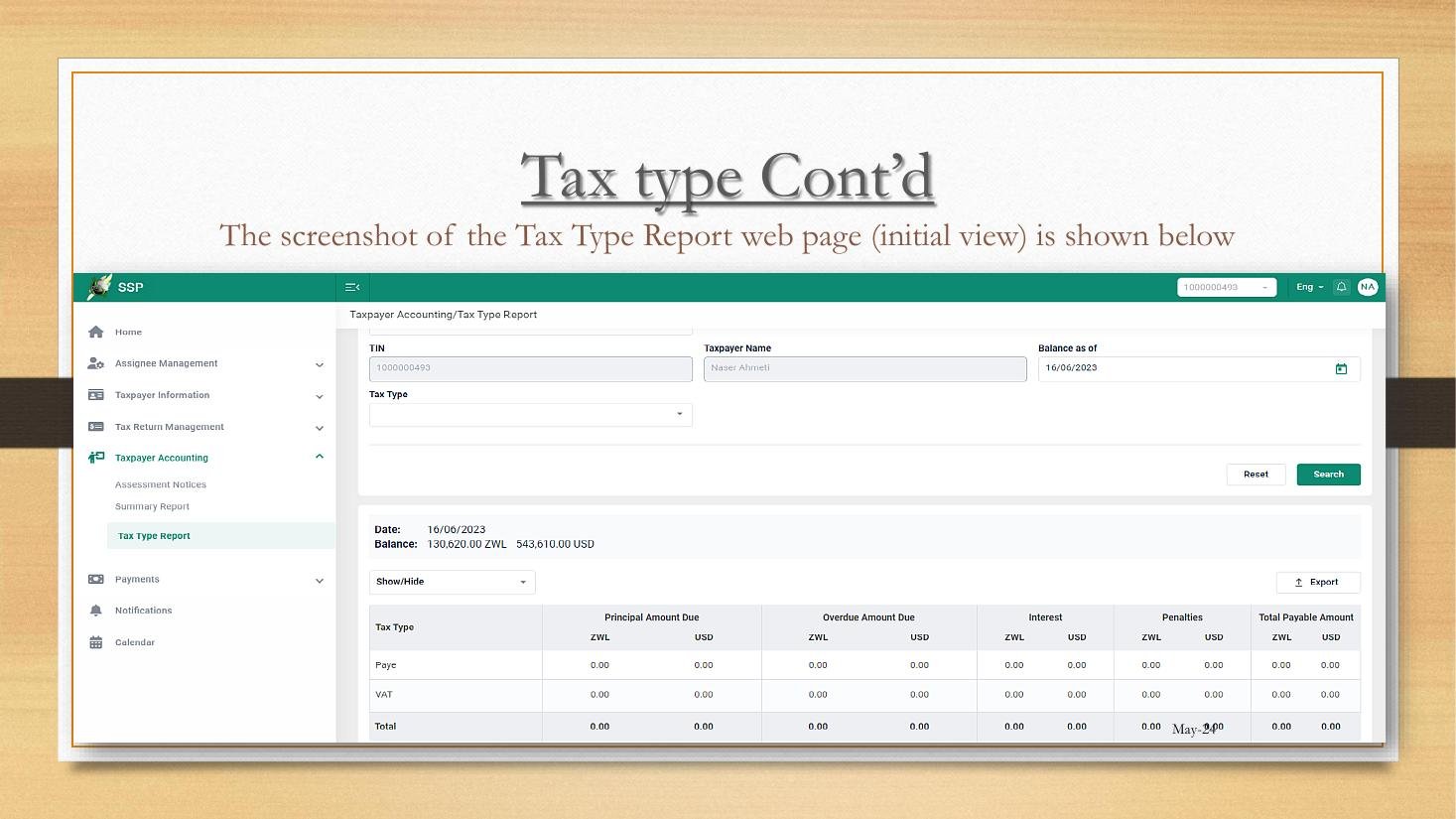
The SSP dashboard with module rail and Tax Type Report
Figure 1.2.A — The SSP dashboard. Note three things: the eleven-module rail on the left, the active TIN at the top-right (1000000493 in this screenshot), and the language toggle (Eng) next to it.

The screen is divided into three regions:

  1. Left-hand module rail. Always visible; clicking a module expands its sub-menu. This is the primary navigation device.
  2. Top header bar. Holds the active TIN selector, language toggle, notifications bell, and profile menu.
  3. Main content area. Whatever module you have selected loads here.

3. The eleven modules in the left-hand rail

ModuleSub-menusUsed for
Home(no sub-menu)Dashboard widgets — outstanding obligations, recent submissions, due-date calendar.
Assignee ManagementRoles, AssigneesGranting and revoking internal-user access (Lesson 3.4).
Taxpayer InformationTaxpayer Profile, Applications, Requests, DraftsThe identity hub. Profile tabs, registrations, change requests.
Tax Return ManagementPending Returns, Submitted Returns, DraftsThe return-filing module. Module 4 lives entirely here.
Taxpayers CertificatesCertificate Requests, CertificatesTax Clearance, TIN, VAT certificates. Lessons 1.3, 5.1, 5.2.
Taxpayer AccountingAssessment Notices, Summary Report, Tax Type ReportThe ledger. Module 7 lives here.
Debt ManagementDebt summary, Payment plansOutstanding-debt resolution (covered in the parallel Debt Management course).
PaymentsSingle Account Transactions, Monitoring, ReportsThe payments hub. Module 6.
Refund ManagementRefund requests, status trackingRefund-claim lifecycle (referenced in Module 7).
Notifications(no sub-menu)System alerts, ZIMRA correspondence inbox.
Calendar(no sub-menu)Due-date calendar; aggregates across all registered tax types.

4. The top-right TIN selector — a tax agent’s lifeline

An individual taxpayer with one TIN never thinks about the TIN selector — their TIN is selected automatically. But every Tax Agent and every employee of a corporate group sees a drop-down of every TIN they have access to, and the selector becomes the single most-used control on the system.

Discipline rule for agents:

The TIN-switch verification step: Before clicking any Submit button, glance at the top-right of the screen and confirm the active TIN matches the client whose return you mean to file. This single habit eliminates the most expensive class of agent error.

5. Notifications, language toggle, and profile menu

The bell icon shows unread system notifications — assessment notices, return acknowledgements, payment confirmations, and correspondence from ZIMRA officers. The language toggle currently switches between English, Shona, and Ndebele where ZIMRA has localised content (the localisation is partial). The profile menu is where the SSP user changes their own password, manages 2FA, and signs out.

6. The dashboard widgets at a glance

WidgetInformation shownAction it links to
Outstanding obligationsPending returns count, debt total in ZWG and USDClick-through to Tax Return Management or Debt Management.
Due-date calendar (mini)Next 7 days of upcoming filing deadlinesExpands to full Calendar module.
Recent submissionsLast 5 returns lodged across any tax typeClick to view acknowledgement.
Single Account balanceConsolidated balance ZWG and USDDrills into Single Account Transactions.

7. The two-click rule

A well-organised SSP user can reach any module from anywhere in the system in two clicks: one click on the rail, one click on the sub-menu. If you find yourself on a third click, you have probably wandered. Click Home on the rail and start again.

D. Real-World Applicability: Login Routines for Each User Group

1. The salaried individual

Tendai Moyo, a salaried payroll accountant, logs into the SSP perhaps three times a year — once to download a tax clearance for his car-finance application, once when his employer tells him a PAYE adjustment has been posted, and once when he files his ITF 1 if his side-income crosses the threshold. For Tendai, the login routine is: enter URL, enter email and password, accept the OTP, click Taxpayer Certificates → Certificate Requests, and he is done.

2. The SME owner-operator

Lily, the kiosk owner from Lesson 1.1, logs in two or three times a month. Her habitual flow:

  1. Login.
  2. Glance at the dashboard for any red badges (outstanding obligations).
  3. Visit Tax Return Management → Pending Returns to file the month’s VAT and PAYE.
  4. Visit Payments → Single Account Transactions to confirm her bank deposit has been allocated correctly.
  5. Logout.

Her entire monthly compliance cycle takes 30–45 minutes once she is well-practised.

3. The corporate Tax Manager

The Tax Manager at Cairns Foods logs in daily during peak filing weeks (the 10th to 25th of each month). Her routine:

  • Login → Notifications inbox → clear any new ZIMRA correspondence.
  • Tax Return Management → Pending Returns → assign Drafts to junior staff via the Assignee Management module.
  • Taxpayer Accounting → Tax Type Report → review balances by tax head.
  • End of day: logout, ensuring no Drafts have been left in an unsubmitted state past 16:00 to avoid concurrent-edit conflicts.

4. The Tax Agent with multiple clients

A Tax Agent at a mid-sized accounting firm services twenty clients. Her login routine is the most disciplined of the four:

  1. Login on the firm’s dedicated SSP credential.
  2. Calendar → aggregate view of all client due dates this week.
  3. For each client requiring action: switch TIN at the top-right → complete the action → verify the TIN before submit → switch to next.
  4. End of day: log a brief in the firm’s practice-management software for each TIN she touched.

The discipline of the TIN switch and the audit log is what separates safe tax-agent practice from negligent practice.

5. Cross-group: the daily-routine checklist

  • Open mytaxselfservice.zimra.co.zw in the browser.
  • Log in; complete OTP if prompted.
  • Confirm the active TIN at the top-right matches the work intended.
  • Clear any unread Notifications before doing anything else.
  • Visit Pending Returns to register what is due this period.
  • Action the items, switching TINs cleanly between clients.
  • Logout when done; do not leave the session open across coffee breaks.

E. Case Law Integration: Authority and Identity in Electronic Filings

1. The principle of strict authentication

Although Zimbabwean case law on SSP impersonation is sparse, the older Income Tax Special Court decision in Eastern Highlands Plantations v. Commissioner of Taxes (Special Court 2004) treated the signature on a return as evidentiary of the taxpayer’s acknowledgement of the contents. Translated to the digital age, the SSP login is the digital equivalent: a return submitted under a TIN’s credentials is presumed to be lodged by that TIN’s authorised user.

2. Persuasive South African authority on credential-sharing

In Adventure Communications (Pty) Ltd v. The Commissioner for SARS (Tax Court 2021), SARS successfully argued that a tax agent who lodged a return under a client’s eFiling credentials — rather than under a properly mandated tax-practitioner profile — could not later distance himself from the contents of the return. The court rejected the agent’s claim that he was a mere “data-entry technician”. The principle is highly persuasive in Zimbabwe: use the Assignee/Tax Agent workflow, not credential-sharing.

3. The duty to keep credentials secure

Under the Cyber and Data Protection Act (sections 7 and 8), any data controller (and the SSP user is treated as a controller of the data they access) has a duty to apply appropriate technical and organisational measures to keep credentials secure. Sharing a password is a textbook breach of that duty.

4. Administrative remedy where credentials are lost

If credentials are believed compromised, the immediate steps are: (i) reset password through the SSP “Forgot password” link; (ii) lodge a written notification with the ZIMRA help desk recording the date of suspected compromise; (iii) audit the History tab of the Taxpayer Profile (Lesson 2.1) for any unauthorised changes during the suspected window. ZIMRA practice is to suspend the affected SSP login pending investigation.

F. Common Pitfalls in SSP Login and Navigation

1. Letting the browser auto-fill the wrong password

Browser password managers can store stale credentials. After a 90-day password reset, the browser may continue offering the old one until updated. Fix: after every password change, manually update the browser-stored entry.

2. Switching TIN mid-edit

If a user switches TIN while they have an unsaved Draft open, the Draft may be lost or saved against the wrong TIN. Fix: always Save Draft before switching TINs.

3. Working from two browser tabs

Two SSP tabs in the same session sometimes share session state in unpredictable ways: a TIN switch in one tab can affect submissions made in the other. Fix: work in a single tab. Use separate browser profiles for separate clients only if you genuinely need parallel sessions.

4. Misreading the Notifications bell

Notifications include both system messages (auto-generated by TaRMS) and officer messages (typed by a ZIMRA officer). The latter often contain action deadlines. Fix: read every notification on first sight; don’t clear-without-reading.

5. Confusing the SSP password with the Single Account bank password

SSP login and bank-portal login are entirely separate credentials. Fix: store them in distinct places; never reuse passwords across the two.

6. Leaving credentials with a departing employee

Already discussed in Lesson 1.1. Repeated here because the most common operational flaw in corporates is forgetting to revoke Assignees on departure.

7. Trusting screenshots

ZIMRA periodically refreshes the SSP UI. Workshop screenshots from May 2024 may differ slightly from what you see today. Fix: rely on the menu names in your training material, not the pixel-positions of buttons.

G. Knowledge Check

Question 1

What is the URL of the SSP, and what is the difference between an SSP login and a TaRMS-internal login?

Question 2

Name the eleven modules in the SSP left-hand rail and identify which module you would visit to (a) file a PAYE return, (b) request a tax clearance certificate, (c) view your consolidated balance across all tax heads, and (d) grant access to a junior accountant in your team.

Question 3 — Scenario

You are a Tax Agent. You have just submitted a VAT return on behalf of Client A. You now need to submit a PAYE return on behalf of Client B. Walk through the exact sequence of actions, including how you verify that you are working on the correct TIN before clicking Submit.

Question 4 — Scenario

You log in and notice the Notifications bell shows a red badge with the number 3. One notification is from a ZIMRA officer asking you to provide additional documentation for an objection. What is the correct sequence of actions, and which other module(s) might you need to visit to respond?

Question 5 — Calculation

Your firm employs a Senior Tax Manager (3 hours per week of SSP time), 4 Returns Clerks (2 hours per week each), and a Compliance Director (30 minutes per week). All five share the same firm SSP account. Identify the legal exposure under the principles in Lesson 1.1 and Lesson 1.2 Section B, and state the correct restructuring of access rights.

H. Quiz Answers with Explanations

Answer 1

The SSP URL is https://mytaxselfservice.zimra.co.zw. The SSP is taxpayer-facing; the TaRMS-internal interface is officer-facing and lives on ZIMRA’s internal network. Both interfaces talk to the same database, but with different permissions: officers can post assessments, taxpayers can submit returns. A taxpayer never sees the TaRMS-internal interface.

Answer 2

The eleven modules: Home, Assignee Management, Taxpayer Information, Tax Return Management, Taxpayers Certificates, Taxpayer Accounting, Debt Management, Payments, Refund Management, Notifications, Calendar.

  • (a) File a PAYE return: Tax Return Management → Pending Returns — Lesson 4.1, 4.2.
  • (b) Request a tax clearance: Taxpayers Certificates → Certificate Requests — Lesson 5.1.
  • (c) Consolidated balance: Taxpayer Accounting → Summary Report — Lesson 7.1.
  • (d) Grant access to a junior accountant: Assignee Management → Roles, then Assignees — Lesson 3.4.

Answer 3

The clean sequence:

  1. After submitting Client A’s VAT return, click the TIN selector at the top-right of the SSP.
  2. From the drop-down, select Client B’s TIN. Wait for the page to refresh.
  3. Confirm the top-right of the screen now shows Client B’s TIN and Client B’s name.
  4. Navigate to Tax Return Management → Pending Returns and locate Client B’s PAYE return.
  5. Open the return, complete the data entry.
  6. Before clicking Submit: glance again at the top-right and verify Client B’s TIN is still active. (TIN sessions can occasionally revert if you used the back button.)
  7. Click Submit. Confirm the acknowledgement screen also displays Client B’s TIN.

This is the pattern Pitfall #2 in Section F warns against deviating from.

Answer 4

The sequence:

  1. Click the Notifications bell. Read each of the three messages in order; do not dismiss without reading.
  2. For the officer’s request for additional documentation: identify the assessment number and tax type referenced in the message.
  3. Visit Taxpayer Information → Taxpayer Profile → History to see whether any related profile changes are pending; visit Tax Return Management → Submitted Returns to retrieve the relevant return; and visit Taxpayer Accounting → Assessment Notices to see the contested assessment.
  4. Lodge the additional documentation as a Request via Taxpayer Information → Requests, attaching the documentation and referencing the assessment number.
  5. Set a calendar reminder for the deadline given in the officer’s message; section 62 of the Income Tax Act gives 30 days for objection-related actions, but the officer may have given a shorter administrative deadline.

Answer 5

The arrangement described is unlawful. ZIMRA Public Notice on TaRMS Migration (October 2023) prescribes that every individual must hold their own SSP login. Under section 16 of the Cyber and Data Protection Act, sharing a credential is unauthorised access; under section 80 of the Income Tax Act, a return lodged by an unidentified user attaches liability to whoever owns the credential, which compounds risk.

Correct restructuring:

  1. The firm registers as a Tax Agent under SI 125 of 2023 (Lesson 3.1) and obtains a 9-digit licence number.
  2. Each of the six individuals (Tax Manager, four Clerks, Compliance Director) creates a personal SSP login.
  3. The clients each assign the licensed Tax Agent to their TIN.
  4. The Tax Manager creates Assignees within the firm and grants each individual the role appropriate to their job (Lesson 3.4).
  5. The shared firm credential is retired and the password rotated.

The administrative cost is one Saturday morning of setup work; the legal exposure removed is unbounded.

I. Key Takeaways

  • The SSP URL is mytaxselfservice.zimra.co.zw. Memorise it.
  • Eleven modules in the rail, top-right TIN selector for tax agents, language toggle for English / Shona / Ndebele.
  • The TIN-switch verification step is the single most important habit a tax agent forms.
  • Two-click rule: any module reachable in two clicks. Three clicks = wandering.
  • Password rules: 8+ chars, mixed case, digit, special; 90-day expiry; 5-attempt lockout; 2FA via OTP.
  • Credential-sharing is unlawful under section 34B RAA, section 80 ITA, and section 16 Cyber Act. Use the Assignee workflow (Lesson 3.4).
  • Notifications inbox carries officer-issued action deadlines; clear it on first login of the day.
  • Always Save Draft before switching TINs.
  • Continuity: Lesson 1.3 next teaches the simplest task on the SSP — downloading the TIN and VAT certificates — before Module 2 dives into the Taxpayer Profile.
TaRMS Essentials Lesson 1.1
Introduction to TaRMS
TaRMS Essentials Lesson 1.2
Logging In & Navigation
TaRMS Essentials Lesson 1.3
TIN & VAT Certificates
TaRMS Essentials Lesson 2.1
Taxpayer Profile
TaRMS Essentials Lesson 2.2
VAT Application
TaRMS Essentials Lesson 2.3
Tax Type Deregistration
TaRMS Essentials Lesson 2.4
TIN Deregistration
TaRMS Essentials Lesson 3.1
Tax Agent Registration
TaRMS Essentials Lesson 3.2
Tax Agent Licence
TaRMS Essentials Lesson 3.3
Assigning Tax Agents
TaRMS Essentials Lesson 3.4
Roles & Assignees
TaRMS Essentials Lesson 4.1
Return Submission
TaRMS Essentials Lesson 4.2
PAYE Return Submission
TaRMS Essentials Lesson 4.3
Amending Current Returns
TaRMS Essentials Lesson 4.4
Filing Past Returns
TaRMS Essentials Lesson 5.1
Automatic Tax Clearance
TaRMS Essentials Lesson 5.2
Manual Tax Clearance
TaRMS Essentials Lesson 6.1
The Single Account
TaRMS Essentials Lesson 6.2
Changing Single Account Bank
TaRMS Essentials Lesson 6.3
Single Account Transactions
TaRMS Essentials Lesson 7.1
Summary Report
TaRMS Essentials Lesson 7.2
Tax Type Report
TaRMS Essentials Lesson 7.3
Assessment Notices
TaRMS Essentials Lesson 8.1
VAT Compliance Workflow
TaRMS Essentials Lesson 8.2
PAYE Compliance Workflow
TaRMS Essentials Lesson 8.3
Common Pitfalls
TaRMS Essentials Lesson 8.4
Monthly & Quarterly Routine
Full Course Menu
TaRMS Essentials
TaxTami TaxTami

Zimbabwe's leading tax education platform, making Zimbabwean tax law simple for students, professionals and business owners.

Courses

  • Income Tax
  • Value Added Tax
  • Capital Gains Tax
  • Debt Management
  • TaRMS Essentials

Company

  • About
  • Team
  • Blog
  • Contact Us

Resources

  • Help
  • Support
  • Sitemap
  • Community

© TaxTami. All rights reserved.

  • Terms and Conditions
  • Privacy Policy